How to Schedule LinkedIn Posts for Multiple Clients
How to Schedule LinkedIn Posts for Multiple Clients

Managing LinkedIn content for multiple clients is defined by one core challenge: LinkedIn’s native scheduler was built for individual users, not agencies. It offers no bulk scheduling, no calendar view, no analytics, and no support for carousel or document posts. Social media managers who try to handle five or more clients through LinkedIn alone spend hours on manual work that purpose-built tools can handle in minutes. The right platform lets you schedule LinkedIn posts across multiple clients from a single dashboard, maintain each client’s brand voice, and protect account security through verified OAuth connections. This article walks through the tools, workflows, and security practices that make multi-client LinkedIn management work at scale.
What are the essential tools for scheduling LinkedIn posts for multiple clients?
LinkedIn’s native scheduler is free but lacks bulk scheduling, calendar views, and analytics. That limitation matters immediately when you manage more than two clients. You cannot upload a batch of posts, you cannot see a month-at-a-glance calendar, and you cannot track which post times drive the most engagement. For agencies, this is not a minor inconvenience. It is a structural problem.
Third-party platforms solve this through OAuth-based account connections, which let you link client profiles without ever touching their passwords. Each client gets an isolated workspace inside your dashboard. Posts, analytics, and approval queues stay separate, which prevents the kind of cross-client errors that damage agency reputations.
The non-negotiable features for any multi-client LinkedIn tool are:
- Bulk upload via CSV: Upload 50+ posts per client in a single session, then adjust timing on a drag-and-drop calendar.
- Client workspaces: Isolated environments per client prevent accidental cross-posting and keep billing, analytics, and content histories clean.
- Approval workflows with audit trails: Clients review pending queues and approve before auto-scheduling, which builds accountability on both sides.
- Analytics per profile: Engagement data by client lets you refine post timing and content type over time.
- Team permissions: Role-based access lets copywriters draft, managers approve, and clients review without giving everyone full account control.
Pro Tip: Before onboarding a new client, create their workspace and set up the approval workflow first. Starting with structure prevents the chaos of retrofitting permissions after content is already live.
Approval workflows with audit trails are especially valuable for regulated industries. A financial services client, for example, needs documented proof that every post passed a compliance review before it went live. Generic scheduling tools rarely provide this. Purpose-built agency platforms do.

How to securely manage access to multiple LinkedIn client accounts?
Secure access is the single most overlooked part of multi-client LinkedIn management. Most agencies start by sharing passwords or juggling multiple browser profiles. Both approaches create serious risk.
Manual login workarounds like multiple browser profiles trigger LinkedIn security flags. LinkedIn detects unusual login patterns, including new devices, new locations, and rapid account switching. The result is account restrictions or outright bans. For an agency, a banned client account is a client relationship at risk.
The correct approach follows four steps:
- Connect via OAuth API only. OAuth API-based connections eliminate device and location flags because the agency never logs into the client’s account through a browser. The connection runs at the API level, which LinkedIn treats as a trusted integration.
- Require multi-factor authentication on client accounts. Before connecting, confirm the client has MFA enabled. This protects the account from unauthorized access independent of your agency’s connection.
- Document every connection. Keep a record of which platform holds access to which client account, the date of connection, and the scope of permissions granted.
- Offboard cleanly. When a client relationship ends, stop all active campaigns, revoke agency access at the connection level, and confirm the client can log in cleanly. Remove client data per your agreement to avoid ongoing liability.
Secure access management and a well-documented offboarding process build client trust and reduce operational risk for agencies managing multiple clients. The moment a client sees you can hand their account back cleanly, their confidence in your agency increases.
Pro Tip: Run a quarterly access audit. Pull a list of every client account your platform is connected to and confirm each connection is still active and authorized. Dormant connections from past clients are a liability.
Clients prefer agencies that provide a clean handover, including immediate access revocation. This is not just good security practice. It is a competitive differentiator when pitching new business.
What is the step-by-step process for scheduling LinkedIn posts across client accounts?
A repeatable scheduling process is what separates agencies that scale from those that stay stuck at five clients. The process below works for teams managing anywhere from three to fifteen clients.
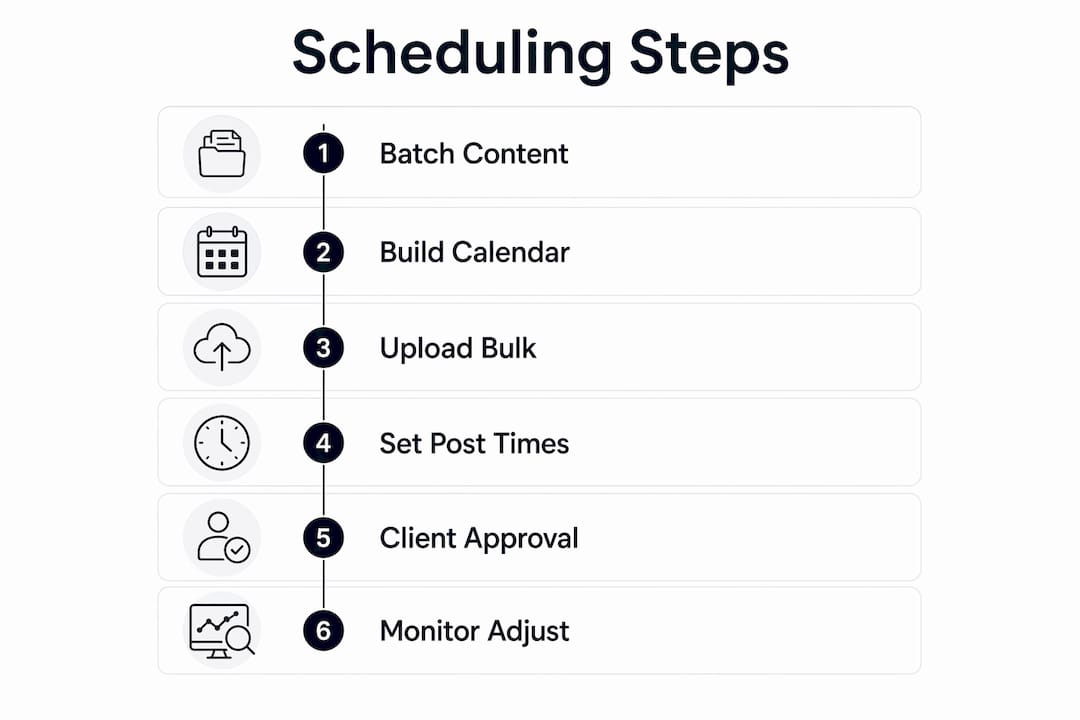
Step 1: Batch content by client, not by platform
Batch content by client rather than trying to create all posts across all clients at once. Open Client A’s workspace, draft two weeks of posts, then move to Client B. This keeps brand voice consistent and reduces the mental switching cost that causes errors.
Step 2: Build a LinkedIn content calendar per client
Use a dedicated calendar view inside your scheduling platform. Map out post frequency first. Posting 2 - 5 times per week drives greater engagement on LinkedIn than sporadic bursts. Block out dates for each client, then fill in content types: text posts, carousels, polls, and video.
Step 3: Upload posts in bulk
Once content is drafted and approved internally, use CSV bulk upload to push all posts into the scheduler at once. Bulk scheduling tools support uploading 50+ posts via CSV per client, which compresses a week of manual scheduling into a single session. Pair this with calendar drag-and-drop to fine-tune timing.
Step 4: Set post times by audience activity
Do not default to generic “best times to post” advice. Pull each client’s audience analytics and schedule posts when their specific followers are most active. A B2B software client’s audience peaks at different times than a healthcare recruiter’s audience.
Step 5: Route posts through client approval
Send the scheduled queue to the client for review before anything goes live. A good approval workflow lets clients comment on individual posts, request edits, or approve the full queue in one click. This step catches brand voice errors, outdated information, and compliance issues before they become public problems.
Step 6: Monitor and adjust
After posts go live, track engagement by client. Scheduling LinkedIn posts saves 20 - 25 hours monthly by planning weeks in advance, but those hours only stay saved if you use analytics to refine the process. Adjust timing, content mix, and post frequency based on what the data shows.
What common challenges arise when managing LinkedIn posts for multiple clients?
Multi-client LinkedIn management fails in predictable ways. Knowing the failure points in advance lets you build systems that prevent them.
- Time zone errors: A client based in London and a client based in Chicago need posts scheduled in their local time zones. A single misconfigured setting can push a post live at 2:00 AM instead of 9:00 AM. Always confirm time zone settings per client workspace before scheduling.
- Brand voice drift: When multiple team members write for the same client, the voice becomes inconsistent. Templates and per-client style guides inside the platform prevent this. AI agents that draft posts in brand voice under human oversight reduce drift further, especially as client volume grows.
- Post duplication: Without isolated client workspaces, the same post can accidentally go to two clients. Centralized dashboards with per-client content libraries eliminate this risk.
- Incomplete offboarding: Leaving a former client’s account connected to your platform after the contract ends creates legal and security exposure. A documented offboarding checklist prevents this.
- No analytics review cycle: Scheduling without reviewing performance data is the most common reason agencies plateau. Build a monthly analytics review into every client retainer.
Pro Tip: Create a client onboarding checklist that covers workspace setup, OAuth connection, time zone configuration, approval workflow activation, and style guide upload. Running through the same checklist for every new client takes 20 minutes and prevents 90% of common errors.
The agencies that manage LinkedIn content for clients at scale share one trait: they treat their internal processes with the same rigor they apply to client deliverables. Ad hoc workflows break under volume. Documented systems do not.
Key Takeaways
The most effective way to schedule LinkedIn posts for multiple clients combines OAuth-based secure access, per-client workspaces, bulk scheduling, and structured approval workflows inside a single platform.
| Point | Details |
|---|---|
| Native LinkedIn scheduler falls short | It lacks bulk upload, calendar views, analytics, and multi-client support. |
| OAuth connections prevent bans | API-level access eliminates device and location flags that trigger LinkedIn restrictions. |
| Batch content by client | Draft all posts for one client before moving to the next to maintain brand voice. |
| Approval workflows build trust | Client review queues with audit trails catch errors and satisfy compliance requirements. |
| Offboarding requires a checklist | Revoking access cleanly protects both the client and the agency from ongoing liability. |
Why I think most agencies underestimate the security side of LinkedIn management
The conversation about multi-client LinkedIn scheduling almost always focuses on efficiency. How many posts can you schedule at once? How fast can you build a content calendar? Those questions matter, but they are the second problem to solve, not the first.
The first problem is access. I have seen agencies lose client accounts because a team member logged in from a new laptop and triggered a security review. I have seen contracts end badly because the agency could not hand back clean account access at offboarding. These are not edge cases. They are the predictable result of treating LinkedIn account management like it is the same as managing a shared Google Doc.
OAuth connections change the equation entirely. When your platform connects at the API level, LinkedIn sees a trusted integration, not a suspicious login from an unfamiliar device. That distinction is the difference between a stable client relationship and a crisis call on a Friday afternoon.
The second thing I would push back on is the instinct to automate everything immediately. AI tools that draft posts in a client’s voice are genuinely useful, especially when you are managing ten or more clients. But the value of AI drafting comes from the human approval layer on top of it. A post that sounds almost right is worse than no post at all for a client with a strong personal brand. Build the approval workflow before you build the content volume.
The agencies I respect most treat their multi-client LinkedIn workflows as a product they are constantly refining. They document what works, they audit their access lists quarterly, and they invest in platforms that grow with them rather than ones they will outgrow in six months.
- Tom
Resonate makes multi-client LinkedIn scheduling manageable
Social media managers who handle LinkedIn content for multiple clients need a platform built for that specific workload, not a general-purpose tool they have to work around.
Resonate gives agencies per-client workspaces, AI-powered content drafting that trains on each client’s actual writing style, and secure OAuth connections that protect every account. The LinkedIn post scheduler supports bulk scheduling and calendar management across all client profiles from one dashboard. Approval workflows let clients review and sign off before anything goes live. If you manage LinkedIn content for businesses and want a platform designed for that exact workflow, Resonate is built for it.
FAQ
What is the safest way to connect client LinkedIn accounts?
OAuth API-based connections are the only reliable method. They eliminate device and location flags that trigger LinkedIn security restrictions, keeping client accounts safe.
How many clients can one social media manager handle on LinkedIn?
A well-structured workflow using dedicated client workspaces and bulk scheduling scales comfortably to 15 clients. Beyond that, team-based access with role permissions becomes necessary.
How often should I post on LinkedIn for clients?
Posting 2 - 5 times per week drives the strongest engagement on LinkedIn. Consistency matters more than volume, so a reliable schedule outperforms sporadic high-frequency bursts.
What should a LinkedIn client offboarding process include?
Stop all scheduled campaigns, revoke platform access at the connection level, confirm the client can log in independently, and document the handover. This protects both parties after the contract ends.
Can I schedule LinkedIn carousels and document posts for clients?
LinkedIn’s native scheduler does not support carousel or document posts. Third-party platforms with full LinkedIn API access handle these formats and include them in bulk scheduling workflows.
Recommended
- LinkedIn Post Scheduler: How to Schedule LinkedIn Posts with AI in 2026 · Resonate
- Resonate for Agencies & Ghostwriters
- Resonate - LinkedIn Content Generator That Sounds Like You
See how Resonate's LinkedIn content generator handles this end to end - from voice training on your real writing to ban-safe scheduling via the official LinkedIn API.

Content Writer @ Resonate
Charlotte explores LinkedIn content, personal branding, AI writing, and founder-led marketing at Resonate. She believes the best content comes from real experience, not generic advice, and writes practical insights to help founders turn what they already know into content that people want to read.
Write LinkedIn content that sounds like you
with Resonate's AI Voice Engine