Role of testimonials in LinkedIn content: a guide
Role of testimonials in LinkedIn content: a guide

Most LinkedIn marketers post testimonials the wrong way. They drop a screenshot of praise in a carousel, add a generic caption, and wonder why nobody cares. The role of testimonials in LinkedIn content goes far beyond copy-pasting kind words. Done right, substantive social proof converts 38% better than generic praise and generates real comment threads instead of passive scrolls. This guide breaks down which testimonial types work, how to embed them into posts your audience actually reads, and the mistakes that quietly kill your credibility.
Key Takeaways
| Point | Details |
|---|---|
| Specificity matters | Detailed testimonials with names and outcomes convert much better than vague praise. |
| Video power | Video testimonials increase trust and conversions more than text alone. |
| LinkedIn algorithm shift | Meaningful engagement like comments and saves now drives testimonial reach. |
| Personal storytelling | Sharing testimonials via founders or employees boosts engagement significantly. |
| Avoid stale proof | Keep testimonials fresh and rotate regularly to maintain credibility and impact. |
Understanding the evolving role of testimonials on LinkedIn
LinkedIn is not the platform it was three years ago. The algorithm has shifted decisively toward rewarding content that earns genuine interaction, not just impressions. LinkedIn’s February 2026 updates prioritize meaningful engagement signals like comments, saves, and dwell time over generic reach. That single change rewrites the rules for how you present social proof.
Testimonials used to work as decoration. A five-star quote on a branded graphic felt like credibility. Today, that same graphic barely gets a scroll-stop. What earns traction is a testimonial embedded inside a story that makes a reader stop and think, “That’s exactly my problem.”
The shift also changes where credibility lives. According to engagement-driven content research, content that keeps readers on the page and generates comments outperforms content optimized purely for clicks. Testimonials that spark a reader’s own reflection trigger that exact behavior.
Here’s what the current LinkedIn environment rewards:
- Authentic specificity. Testimonials naming a real person, their role, and a concrete result outperform anonymous or vague praise every time.
- Narrative framing. A testimonial inside a before-and-after story gets saved. A testimonial in a static quote card gets skipped.
- Consistency over volume. Posting one testimonial-driven story per week with genuine context beats five shallow posts with lifted quotes. See LinkedIn testimonial guidelines for format tips that align with current platform norms.
- Conversation hooks. Ending a testimonial post with a genuine question turns it from a broadcast into a thread.
Types of testimonials that convert best on LinkedIn
With a grasp of LinkedIn’s engagement priorities, let’s look at which testimonial types actually perform on the platform.
Not all testimonials carry the same weight. The format matters as much as the content itself. Here’s how the four primary types compare:
| Testimonial type | Conversion impact | Best format for LinkedIn | Trust signal strength |
|---|---|---|---|
| Named review with specific outcome | High (38% better than generic) | Short post with story context | Very high |
| Video testimonial | Very high (up to 80% lift) | Native video upload | Highest |
| Case study with metrics | High | Long-form post or article | High |
| Usage statistics (“10,000+ users”) | Medium | Caption or post opener | Medium |
Named reviews with full context are the baseline. When you share a testimonial from “Sarah Chen, Head of Marketing at a Series B SaaS company, who grew her pipeline by 40% in 90 days,” readers can see themselves in that story. The specificity is what makes it believable.

Video testimonials are underused on LinkedIn but carry the highest trust signal. A 60-second clip from a real customer talking through their experience does something text cannot: it shows facial expression, hesitation, genuine enthusiasm. Video testimonials can increase sales page conversions by up to 80%, and that same principle holds for LinkedIn native video posts.
Case studies with measurable outcomes work especially well in long-form LinkedIn articles or multi-slide carousels. They give decision-makers the evidence they need to advocate for you internally. Numbers, timelines, and before-and-after comparisons carry weight that vague praise never will.
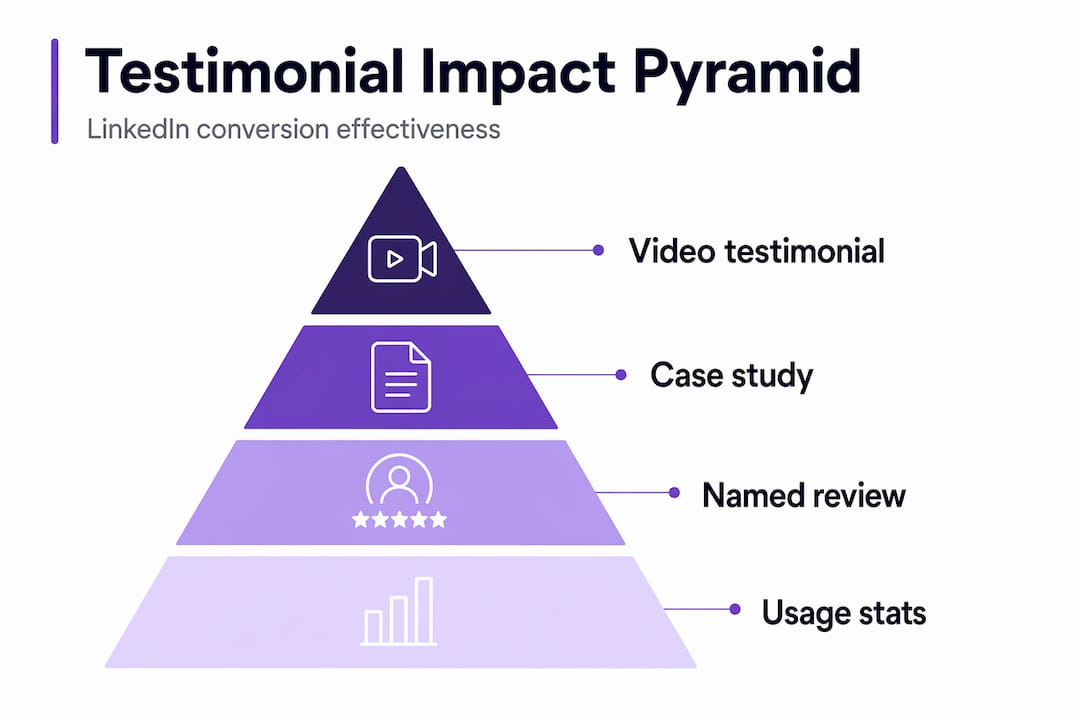
Usage statistics (“Over 5,000 teams rely on this”) work well as credibility openers but should not stand alone. They reduce perceived risk but don’t trigger emotional resonance. Pair them with a named story.
Testimonial post examples that combine named reviews with a personal narrative consistently outperform those that rely on a single format. You can also explore content creation tools for testimonials to produce these posts at scale without losing your voice.
For deeper tactics on driving social proof engagement, pair each testimonial type with a post format designed to hold attention past the first three lines.
Pro Tip: Before posting a video testimonial, send your customer three specific questions rather than an open prompt. “What did you try before this?” “What changed after 30 days?” “What would you tell someone on the fence?” You’ll get usable, story-shaped answers every time.
How LinkedIn endorsements and recommendations influence visibility and credibility
Beyond testimonials in posts, your LinkedIn profile itself carries two built-in social proof tools: endorsements and recommendations. Most people treat them as the same thing. They are not, and using them interchangeably is a missed opportunity.
LinkedIn endorsements are one-click skill validations from your connections. They’re lightweight but meaningful for discoverability. Profiles with 5+ skills endorsed get 17x more views, and endorsements function as a secondary ranking factor in LinkedIn Recruiter search. The volume threshold that matters most is 10 to 15 endorsements per skill for your top three.
LinkedIn recommendations are a different category entirely. These are written testimonials from colleagues, clients, or managers that live permanently on your profile. Decision-makers read recommendations before they read your bio. A well-written recommendation from a recognized name in your industry carries more weight than a hundred endorsements.
Here’s how to use both strategically:
- Request endorsements selectively. Ask only for skills you actively use and want to be found for. A long list of endorsements for irrelevant skills dilutes the signal.
- Give endorsements to earn them. When you endorse others thoughtfully, many reciprocate, and it keeps your name visible in their notifications.
- Treat recommendations as testimonials in disguise. A strong recommendation can be reshared (with permission) in a LinkedIn post as a storytelling anchor.
- Keep your top three endorsed skills aligned with your current positioning, not your career five years ago.
See maximizing LinkedIn profile visibility for a breakdown of how profile-level social proof interacts with your content reach.
Pro Tip: When asking for a recommendation, give the person a brief context prompt. “I’d love if you could mention the specific project we worked on and the outcome you noticed.” It’s not ghostwriting their recommendation. It’s helping them write a useful one instead of a generic one.
Best practices for integrating testimonials into LinkedIn content
Understanding testimonial types and LinkedIn profile leverage sets you up well. Now comes execution: how do you actually embed testimonials into posts so they earn reach and trust?
-
Lead with the story, end with the proof. Open your post with the problem your client faced, tell the story of what changed, then introduce the testimonial as confirmation. Testimonials woven into personal narratives trigger comment threads that LinkedIn’s algorithm rewards with distribution.
-
Use your own voice, not a polished press release. If a testimonial sounds like it came from a marketing team, it reads like one. Write the surrounding context the way you’d tell it to a colleague. Readers can feel the difference.
-
Let founders and employees post, not just company pages. Founder or employee personal testimonial posts see 10x higher engagement than corporate carousel ads. This is not a small gap. If your company account is your only publishing channel, you’re leaving most of your potential reach on the table.
-
Automate collection tied to milestones. The best time to ask for a testimonial is right after a customer hits a result, their first win, their first month, their first renewal. Build a simple trigger at each milestone. Fresh testimonials beat archived ones every time.
-
End your post with a comment prompt. “Has this matched your experience?” or “What’s been the biggest obstacle for you here?” turns a testimonial post into a conversation that compounds reach. Save-worthy posts also get a distribution boost, so close with an insight worth bookmarking.
Check incorporating testimonials successfully for post templates that follow this structure.
Common pitfalls and how to avoid them with LinkedIn testimonials
Now that you know how to use testimonials well, it’s worth knowing what quietly destroys their impact.
“Outdated or generic testimonials are increasingly ignored by sophisticated B2B buyers.” - Vidlo, 2026
The most common mistakes:
- Using old testimonials without context. A testimonial from two years ago reads as stale unless you frame it with a “this still holds true because…” update.
- Generic praise with no specifics. “Working with them was amazing” helps no one. It says nothing about outcomes, timelines, or the person’s actual situation.
- Fake or AI-generated testimonials. Beyond being dishonest, fake testimonials cause brand damage that authentic ones cannot recover from. Buyers are increasingly good at detecting manufactured praise.
- Burying the testimonial at the end of a post. By the time a reader reaches the testimonial, they’ve already decided whether to trust you. Place your most powerful proof near the opening, or near a call to action.
- Publishing too many testimonials too fast. Volume signals desperation, not confidence. One strong, specific story per week builds more trust than four shallow ones.
See avoiding testimonial mistakes for a practical checklist you can apply before any testimonial post goes live.
The overlooked power of personal testimony architecture on LinkedIn
Most LinkedIn creators treat testimonials as reactive. A client says something nice, you screenshot it, you post it. That’s not a strategy. That’s luck with formatting.
The creators who compound their credibility over time treat social proof as an ongoing architecture, not a one-time asset. They build it continuously, not sporadically. Founders sharing customer testimonials personally see 10x higher engagement than company page posts, but the creators doing this consistently aren’t waiting for testimonials to arrive. They’re creating the conditions for them to flow.
That means automating collection tied to customer milestones. It means having a repeatable format for turning raw praise into a LinkedIn story. It means recognizing that social proof is not a campaign asset but a compounding advantage when operationalized as continuous, AI-aided pipelines.
The real shift happens when you stop thinking about a testimonial as a piece of content and start thinking about it as a node in your trust infrastructure. Every testimonial you publish teaches your audience what results look like, who you work with, and what transformation feels like. That cumulative picture is what converts skeptics into buyers, and passive followers into advocates.
Build that picture deliberately. Collect at milestones, share with narrative context, rotate regularly, and let your own voice carry the story. Building personal testimonial pipelines is the single highest-leverage thing most LinkedIn creators are not doing systematically.
Leverage Resonate to amplify your testimonial-driven LinkedIn content
After learning how to use testimonials strategically, the next question is always the same: “How do I actually do this consistently without it taking over my week?”
That’s exactly what Resonate is built for. Resonate trains on your real voice, connects to your work tools like Notion, Slack, and HubSpot, and surfaces relevant testimonial moments you can turn into posts without starting from scratch. Its AI-powered content engine generates posts in your tone, predicts engagement before you publish, and includes community boost features that amplify reach right after your post goes live. You get the full testimonial pipeline, from collection signal to published story, inside a single platform. Start building your authority with Resonate’s LinkedIn content tools and let your testimonials do the heavy lifting.
Frequently asked questions
What is the difference between LinkedIn endorsements and recommendations?
Endorsements are quick skill validations that boost profile search visibility, while recommendations are detailed testimonials that build deeper trust with decision-makers. LinkedIn endorsements improve search visibility, but recommendations carry more weight when buyers or recruiters evaluate your credibility.
How can video testimonials improve my LinkedIn content performance?
Video testimonials convey emotion and authenticity that text cannot replicate, making viewers far more likely to trust and engage with your post. Video testimonials can increase sales page conversions by up to 80%, and the same trust dynamic applies to LinkedIn native video.
Why should I avoid using generic testimonials on LinkedIn?
Generic testimonials without names, outcomes, or specifics read as manufactured praise and are discounted by experienced B2B buyers. Substantive social proof converts 38% better than generic praise, making specificity a direct revenue variable, not a style preference.
How often should I update or rotate testimonials in my LinkedIn content?
Rotate testimonials at least every quarter, tying new ones to recent customer milestones for maximum relevance. Rotating proof regularly maintains conversion impact and prevents your audience from tuning out content they’ve already seen.
Can endorsements on LinkedIn directly get me more profile views?
Yes. Profiles with strong endorsement counts across their top skills rank significantly higher in recruiter and buyer searches. Profiles with 5+ skills endorsed get 17x more views, with endorsements acting as tiebreakers in LinkedIn Recruiter search results.
Recommended

Content Writer @ Resonate
Charlotte explores LinkedIn content, personal branding, AI writing, and founder-led marketing at Resonate. She believes the best content comes from real experience, not generic advice, and writes practical insights to help founders turn what they already know into content that people want to read.
Write LinkedIn content that sounds like you
with Resonate's AI Voice Engine