How to Surface Post Ideas from Client Work
How to Surface Post Ideas from Client Work

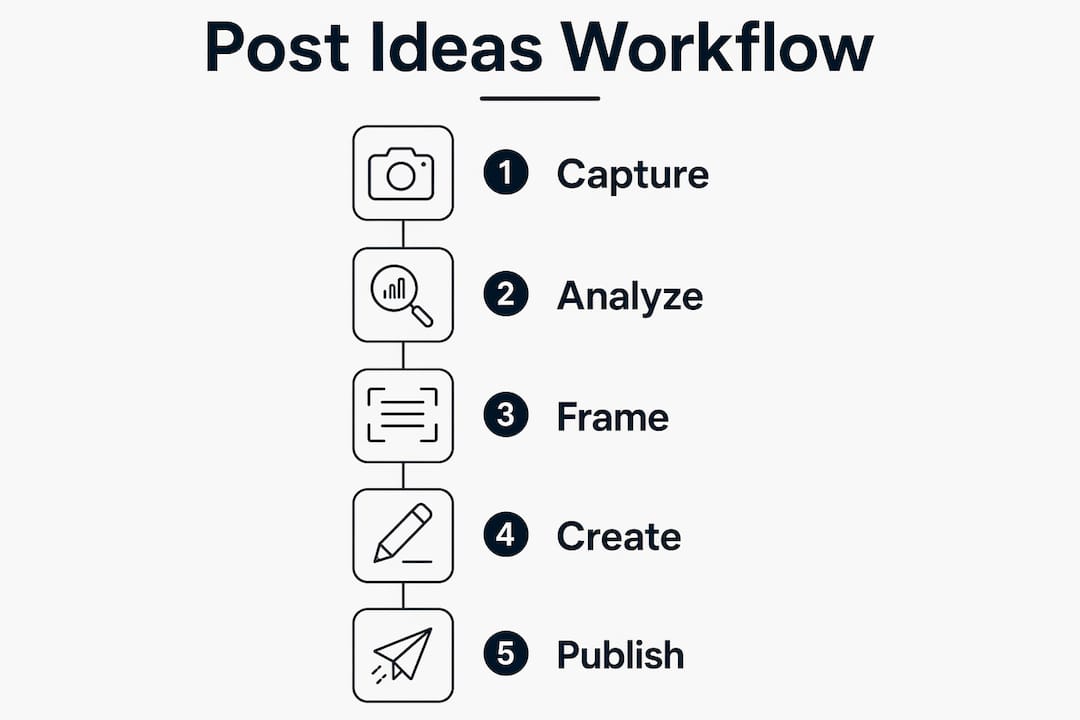
Your best content ideas are already sitting in your inbox, your call notes, and your project files. The most direct way to surface post ideas from client work is to treat every client interaction as raw material: capture the questions they ask, the objections they raise, the moments they light up, and the confusion that makes you explain something twice. That discipline alone fills a content calendar without a single brainstorming session.
Here is what that looks like in practice:
- Capture during calls. Keep a note open during every demo, discovery call, or check-in. Drop fragments, not essays: “why does it cost more,” “confused about timeline,” “lit up at the dashboard.”
- Do a five-minute post-call dump. Right after the call ends, answer four questions: What did they ask? What confused them? Where did they lean in? What did they push back on?
- Run an end-of-project review. A 15-minute review captures process breakdowns, surprises, and “what not to do” moments before memory fades.
- Save client questions to a running list. Emails, webinar chats, social comments - anything a real person asked goes into a “Blog Ideas” folder or doc.
The formats that come out of this process almost write themselves: how-to posts, client win stories, pain point explainers, FAQ expansions, and “mistakes I see all the time” posts. The blank page was never a creativity problem. It was a raw material problem, and client work solves it.
How do you find post ideas in client work?
Client work generates content across at least seven distinct categories, each with a different angle and a different audience hook.
-
Process breakdown posts. Walk through your workflow step by step. Potential clients read these to understand what working with you actually looks like, and they position you as someone who has thought carefully about their craft. A brand designer might publish “The 6 stages of every logo project I run” and attract clients who want that level of structure.
-
Client Q&A posts. Turn the questions clients ask before and during projects into standalone posts. If the same question comes up in three separate calls, it belongs on your website and your LinkedIn feed. Saving those questions into a dedicated folder builds a library of audience-driven topics that can fill a full year’s content calendar. If you want to try this yourself, spin up a draft with Resonate's LinkedIn content generator.
-
Before/after and client success stories. The transformation narrative is one of the most durable content formats. A specific before state, a specific intervention, a specific result. Anonymized is fine: “a mid-size e-commerce brand I worked with in Q1” tells the story without exposing confidential details.
-
“What not to do” and lessons-learned posts. These attract readers who are nervous about making mistakes and want reassurance from someone who has seen the pitfalls. They also quietly demonstrate expertise without sounding like a sales pitch.
-
How-to and tutorial posts. Take one thing you explain repeatedly to clients and write it out. The goal is not to give away your entire service for free. It is to show you can make a hard thing simple, which is exactly what clients pay for.
-
Templates, frameworks, and checklists. Any structure you reuse across multiple clients is a content asset waiting to be published. A stakeholder interview guide or a project briefing checklist becomes a valuable post the moment you document it once and share it.
-
Repurposed deliverables. Reports, audits, and data outputs from one client often contain insights that apply broadly. Strip the identifying details and publish the pattern.
| Content type | Source in client work | Best format |
|---|---|---|
| Process breakdown | Your standard workflow | Long-form post or carousel |
| Client Q&A | Repeated pre-sale questions | FAQ post or short video |
| Before/after story | Project outcomes and metrics | Case study or LinkedIn post |
| “What not to do” | Mistakes and surprises | List post or thread |
| How-to tutorial | Things you explain twice | Step-by-step post |
| Templates and frameworks | Reused deliverables | Download or carousel |
| Repurposed data | Reports and audit findings | Stat post or infographic |
How do client pain points become your best content?
The most valuable content you can publish addresses a fear your buyer already has but has not yet articulated. Client calls surface those fears in real time, which is why active listening during calls is a content skill, not just a service skill.
- Listen for hesitation, not just questions. A client who goes quiet after you mention pricing is telling you something. So is the one who says “we tried something like this before.” Those pauses and hedges are the raw material for your most resonant posts.
- Find the question behind the question. When a client asks “how long does this take,” they are often really asking “will this disrupt my team” or “can I justify this to my boss.” Addressing the deeper concern creates stronger content than answering the surface question.
- Turn every objection into a generous post. “Why a custom build costs more than a template, and when it is worth it” is a stronger piece than anything invented from a blank page, because it answers a real hesitation a real buyer said out loud. The post is not defensive. It is educational.
- Track repeat questions as funnel signals. If people are confused about the same thing in a paid demo, your website is confusing people who never book the call. The repeat question is not just a content idea. It is a leak in your funnel that content can plug.
- Batch your objection-driven ideas weekly. Keep an unformatted question list and process it once a week rather than trying to organize ideas in the moment. Batch processing prevents the capture habit from becoming a burden.
Pro Tip: After every call, write down the single most surprising thing the client said or asked. Over four weeks, you will have a pattern. That pattern is your next content series.
What makes behind-the-scenes content actually build trust?

Behind-the-scenes content works when it shows real work, real challenges, and real problem-solving. It fails when it is just filler dressed up as transparency.

The most powerful behind-the-scenes posts are built around specific emotional moments: the client who said “oh, I finally get it” after you explained something a third way, or the project that nearly went sideways before one decision fixed everything. Those moments are hooks. The exact sentence that made a client lean in during a demo is worth more than any headline you could invent, because it was discovered live, in real time, with a real buyer.
Anonymizing client stories is straightforward in practice. “A national membership organization I worked with recently” tells the story without exposing anyone. The general principle: insights and approaches are yours to share; specific client information is not, without permission. Most clients are fine with a brief, anonymous mention if you frame it correctly. When in doubt, ask.
Client testimonials and feedback work the same way. A testimonial is not just social proof to paste on a landing page. It is a content brief. The specific language a client uses to describe their result tells you exactly what your audience values, and that language belongs in your posts.
Pro Tip: Keep a “client moments” note in your phone. Every time a client says something that surprises you, delights you, or makes you think “I should write about that,” add it. Review it every Sunday before your writing session.
What systems help you generate content from client projects at scale?
The freelancers and content creators who never run out of post ideas are not more creative. They have better capture habits and, increasingly, better tools.
-
Write a project wrap memo the week work ends. A rough memo written immediately after a project closes is worth far more than a detailed writeup attempted months later from memory. Cover what you delivered, what the results were, and the key surprises. Bullet points are enough. A voice memo transcribed works just as well.
-
Use an AI case study generator to turn that memo into assets. Tools that follow the challenge-to-solution-to-results framework can produce a 600 - 800 word case study plus social media assets from just 5 - 10 minutes of client information input. One memo becomes a LinkedIn post, a one-page summary for proposals, and three social media versions.
-
Mine meeting transcripts weekly. Meeting transcript analysis tools can automatically extract stories, customer truths, lessons, and frameworks from client calls, categorizing ideas by interest level and channel fit. The output is a running ideas file you pull from instead of a blank page you stare at.
-
Batch your content creation from weekly-accrued insights. Pick one day a week to write. By then, your running ideas file has five to ten lines from real buyer conversations, in their words, ready to become posts. The writing session that used to take two hours of staring takes forty minutes when the thinking is already done.
-
Use a platform that connects your work tools to your content workflow. Resonate integrates with tools like Notion, Slack, HubSpot, and GitHub to pull in relevant data and surface personalized LinkedIn post ideas calibrated to your voice. Rather than manually transferring insights from your project tools to a content doc, the platform does that extraction automatically, then predicts engagement before you publish.
Pro Tip: Set up a “Project Close Kit” habit: the moment a project wraps, fill out a short form covering client name, results achieved, and one surprising moment. Do it before you close the Slack channel. That five-minute habit is the difference between a case study that gets written and one that never does.
How does client work connect to your broader business mission?
Every project you complete is evidence of your values, not just your skills. Sharing that connection publicly is one of the most underused content strategies for freelancers and consultants.
A post about why you took on a particular type of client, or why you turned one down, tells your audience more about who you are than any “about me” page. If you specialize in working with nonprofits because you believe communications should serve communities, say that. Write about a project where that belief shaped a decision. The specificity is what makes it land.
Client work also gives you concrete proof for mission-driven claims. “I help small businesses compete with larger ones” is a statement. “Here is how a three-person bakery outranked a national chain in local search after we rebuilt their content strategy” is a story. The story does the work the statement only promises to do. Tying your mission to a real client outcome makes both more credible.
How do you collaborate with clients to co-create content?
Some of the best content you can publish does not come from you alone. It comes from a genuine conversation with a client who is willing to share their perspective publicly.
A client Q&A post is the simplest version of this. Send a client five or six questions about their experience working with you and their business more broadly. They write most of the post. You edit and publish it. The result reads as authentic because it is, and it gives the client a piece of content they are motivated to share with their own audience, which extends your reach.
Co-created content can go further. A joint webinar, a podcast episode where a client walks through their results, or a LinkedIn post where you tag a client and they add their perspective in the comments all generate reach you cannot manufacture alone. The key is framing the collaboration as genuinely useful to the client, not just a favor to you. When clients see that sharing their story positions them as a leader in their field, the ask becomes easy.
How do you spot trending topics inside your clients’ industries?
Your clients are often closer to their industry’s current conversations than you are, which makes them a better trend signal than any algorithm.
Pay attention to what clients bring up unprompted at the start of calls. When three different clients in the same industry mention the same new regulation, platform change, or competitor move in the same month, that is a trending topic with a built-in audience. Write the post that explains what it means and what to do about it.
Webinar questions and social media comments from clients in a specific sector work the same way. A question that shows up repeatedly in your inbox from people in one industry is a signal that the topic is underserved in that space. You do not need a keyword tool to find it. You need to pay attention to your inbox and your call notes.
How do storytelling frameworks turn client work into posts people actually read?
Raw client insights need a frame to become compelling content. The most reliable one is also the simplest: problem, action, result.
Start with the situation your client was in before you worked together. Be specific about the problem, not vague about the category. “A consultant who couldn’t get consistent leads from LinkedIn” is more gripping than “a professional struggling with marketing.” Then describe what changed and what the outcome was. Numbers help, but a specific behavioral change works too: “she went from posting once a month to three times a week, and her first inbound inquiry came in week two.”
The “light-up moment” framework from client demos is a variation on this. You describe the exact moment a client understood something, then build the post around what you said in the ten seconds before that moment. That sentence, the one that made them lean in, is your hook. It was discovered live, with a real buyer, which means it already works. You are not guessing at what resonates. You are reporting what already did.
For longer-form content, the challenge-to-solution-to-results structure that case study generators use maps directly onto LinkedIn carousels, blog posts, and email newsletters. One client project, told through that frame, becomes a piece of B2B content that attracts the next client who recognizes their own situation in the story.
Key Takeaways
Client work is the most reliable source of post ideas because it captures real buyer language, real fears, and real outcomes that no brainstorming session can replicate.
| Point | Details |
|---|---|
| Capture during every call | Keep a note open and drop fragments in client language; do a five-minute post-call dump before closing the laptop. |
| Mine pain points and objections | Repeated client questions signal funnel gaps; turn each objection into a generous, educational post. |
| Write a wrap memo immediately | A rough memo written the week a project closes is the foundation for case studies, LinkedIn posts, and proposals. |
| Use AI tools to multiply output | A 600 - 800 word case study plus social assets can be generated from 5 - 10 minutes of client information input. |
| Apply storytelling frameworks | The problem-action-result structure turns any client project into a post that attracts the next similar client. |
Turn Your Client Work Into LinkedIn Posts With Resonate
The methods above work. The bottleneck is usually not knowing what to write. It is the time between having a good idea and publishing a polished post.
Resonate connects directly to the tools you already use, including Notion, Slack, HubSpot, and GitHub, and pulls in the client insights sitting in those tools to surface post ideas calibrated to your voice. Every draft gets scored by AI critique agents before you publish, so you are not guessing whether a post will land. And because Resonate trains on your individual writing patterns, the content it generates sounds like you, not like a template.
If you are ready to stop letting your best client moments evaporate, Resonate turns the raw material you already have into LinkedIn content that builds your audience and shortens your sales cycle.
Recommended

Content Writer @ Resonate
Charlotte explores LinkedIn content, personal branding, AI writing, and founder-led marketing at Resonate. She believes the best content comes from real experience, not generic advice, and writes practical insights to help founders turn what they already know into content that people want to read.
Write LinkedIn content that sounds like you
with Resonate's AI Voice Engine