Safe Posting Automation for LinkedIn: Agencies & Professionals
Safe Posting Automation for LinkedIn: Agencies & Professionals
 . If you want to try this yourself, spin up a draft with Resonate's LinkedIn content generator.
Safe posting automation means using official platform APIs to schedule and distribute content while keeping a human in the loop for every approval, voice check, and engagement response. On LinkedIn specifically, scheduling via official APIs is explicitly permitted and carries no inherent penalty. The risk comes from behavioral automation: auto-DMs, mass likes, and auto-follows. Get that distinction right and automated posting becomes a genuine productivity tool, not a liability.

The bottom line: automate distribution and AI-assisted drafting. Keep judgment, approval, and replies human. Platforms like Resonate operationalize this split with configurable guardrails, voice calibration, and mandatory approval gates before anything reaches your LinkedIn feed.
What safe posting automation actually means for LinkedIn
The concept breaks into four distinct layers, and confusing them is where most teams get into trouble.
- Distribution: Scheduling and publishing via official LinkedIn APIs. This is low-risk and platform-approved. A scheduler fires the API call at the right time. Nothing more.
- Creation: AI generates a first draft, pulling from your voice model, recent work data, or connected tools like Notion or HubSpot. The draft is a starting point, not a finished post.
- Validation: Before anything enters the publish queue, it passes through approval gates. A human reviews the draft, checks facts, and confirms the voice sounds right.
- Engagement: After a post goes live, a real person handles replies. Automation surfaces the notifications and routes them. It does not respond.
Scheduling through official APIs is safe. The platform enforcement targets behavioral automation - auto-DMs, mass follows, and bot-driven engagement - not scheduled publishing. Treat those two categories as entirely separate systems with entirely different risk profiles.
Where tools like Resonate fit: they pull signals from Slack, GitHub, and CRM data to surface post ideas, generate voice-calibrated drafts, and then hold everything in an approval queue until a human signs off. The integration with workplace data sources is what makes the drafts contextually relevant rather than generic.
Core safety principles every automation system must enforce
These are the non-negotiables. Skip one and the system degrades from safe automation into a liability.
- Human approval before every publish. Every post needs human sign-off before it enters the publishing queue. No exceptions for “low-risk” posts.
- Platform-specific formatting. LinkedIn has its own character limits, media specs, and content policies. A post formatted for X will look wrong and may trigger suppression.
- Configurable rate limits. Set per-account daily and weekly posting caps. Burst patterns, even from legitimate API calls, can read as bot behavior.
- Tiered rollout. Start with scheduling, add AI drafting once the rhythm is stable, then layer in workflow integrations. Automating everything at once is the most common failure mode.
- Reply routing. Automation should surface incoming comments and route them for human response. Auto-replies at scale signal bot behavior to LinkedIn’s detection systems.
Pro Tip: Treat LinkedIn as a higher-sensitivity channel than most. The professional context means a single off-brand or factually wrong post carries more reputational weight than the same mistake on a lower-stakes platform. Stricter human-in-the-loop controls are worth the extra review time.
How to roll out safe posting automation in phases
A phased approach lets you build confidence and catch problems before they compound. Each phase has a clear entry condition and a success metric.
-
Phase 1 - Publishing foundation (weeks 1 - 3). Choose a scheduler that publishes via official APIs. Map your platforms, set post templates, and establish a content calendar. Success metric: posts go live on schedule with zero manual errors.
-
Phase 2 - AI-assisted drafting (weeks 4 - 8). Add voice-calibrated draft generation. Every draft goes into an approval queue before publishing. Run this as a pilot with one account. Success metric: approval turnaround under 24 hours, drafts accepted with minor edits.
-
Phase 3 - Workflow integrations (months 2 - 3). Connect Notion, HubSpot, Slack, or GitHub to feed content signals into the drafting layer. Enable smart triggers: a closed deal in the CRM surfaces a post idea; a GitHub release generates a product update draft. Success metric: time-to-publish drops, post frequency increases without added manual effort.
-
Phase 4 - Scale and guardrails (month 3 onward). Configure per-account rate limits and monitoring alerts. Add community-boost steps for high-priority posts. Expand to multi-account or agency flows with per-client voice models and white-label reporting.
Pro Tip: Batch-create content once a week rather than drafting daily. A weekly review session where you approve, edit, and queue the next seven days of posts is faster than daily micro-decisions and produces more consistent output.
How integrations and validation logic work together
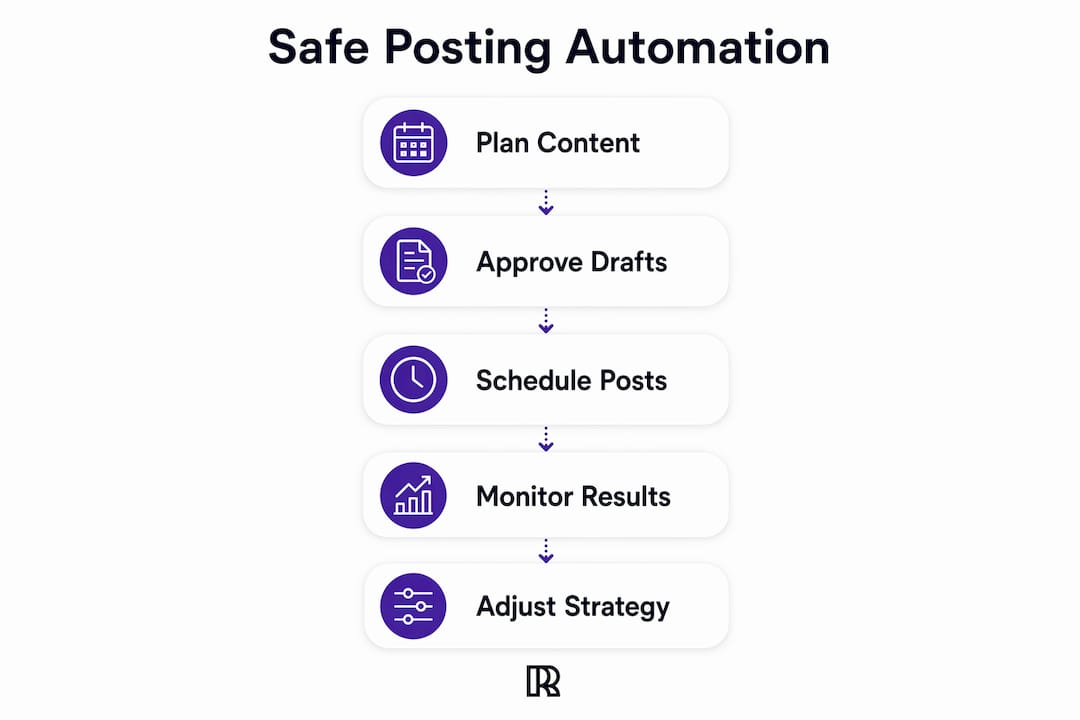
The integration layer feeds the drafting layer. The validation layer sits between drafting and publishing. Keep those two functions technically separate or errors compound.
Data sources that feed drafting:
- Notion databases for long-form content and project notes
- Slack channels for team updates and product announcements
- HubSpot or Salesforce for deal milestones and customer signals
- GitHub for product releases and engineering updates
Where validation runs:
- Pre-publish: format checks, character counts, banned-term scans, and policy constraint checks before the API call fires
- Post-publish: inspect API return codes and monitor for suppression signals in the first hour
Integration map (simplified):
- Data source triggers a draft signal.
- AI generates a platform-specific draft.
- Draft enters the approval queue; Slack notification routes to the reviewer.
- Human approves or edits.
- Approved post enters the publish pipeline.
- API call fires at scheduled time; return code logged.
- Post-publish monitoring begins.
This separation means a bad draft never reaches the API call. Catching errors in the draft phase is cheap. Catching them after a post goes live is not.
Guardrails and AI checks that reduce ban risk
Operational guardrails are what separate a safe system from a fast one. Speed without guardrails is how accounts get flagged.
- Validation-before-publish: Run platform constraint checks, fact-check prompts against internal data, and banned-term scans on every draft before it reaches the approval queue.
- Configurable posting caps: Set daily and weekly limits per account. A professional posting more than once per day on LinkedIn consistently reads as automated to both the algorithm and real followers.
- AI critique scoring: Before a draft reaches the human reviewer, run it through a scoring layer that checks readability, originality, and brand-voice match. Low-scoring drafts get flagged for heavier editing, not just a quick approval.
- Alerting for anomalies: Monitor for sudden drops in reach, policy warnings from LinkedIn, or spikes in negative feedback. Any of these should trigger a pause and human review before the next post fires.
Pro Tip: Configure your AI critique layer to flag drafts that score below a threshold for voice match. A draft that sounds generic is a draft that will underperform, and it is also a signal that the voice calibration needs retraining.
For a deeper look at where LinkedIn’s risk profile differs from other channels, the LinkedIn engagement automation risks breakdown covers the specific behaviors that trigger account restrictions.
Scheduling best practices that avoid algorithmic red flags
Timing and cadence matter as much as content quality. A well-written post published at the wrong cadence still looks automated.
- Avoid burst posting. Multiple posts in a short window, even via official APIs, pattern-match to bot behavior. Space posts by at least several hours.
- Never cross-post identically. Tailor copy and formatting for each platform. What works on LinkedIn reads wrong on X. Platforms actively suppress content flagged as duplicate.
- Use data-backed posting windows. Fixed intervals (every Tuesday at 9 AM, forever) are less effective than windows informed by your own engagement analytics. Let performance data shift your schedule over time.
- For LinkedIn specifically: one to three posts per week is a sustainable professional cadence. Agencies managing multiple client accounts should stagger posting times across accounts to avoid identical patterns.
- Leave gaps. A calendar with every slot filled looks automated. Reserve one or two open slots per week for timely, reactive content.
- Schedule a reply window. Auto-publishing without showing up to reply is one of the clearest bot signals. Block 15 minutes after each post goes live to engage with early comments.
How to monitor results and catch safety signals early
Monitoring is not optional. It is the feedback loop that keeps the system calibrated and catches problems before they escalate.
Watch these signals:
- Sudden drops in impressions or reach on posts that previously performed normally
- Declining comment quality or engagement rate over a rolling two-week window
- API error rates above baseline on publish attempts
- Any policy-related notification from LinkedIn
Set threshold alerts so that when reach drops below a defined floor or error rates spike, the system pauses and routes a review notification to the account owner. Do not rely on weekly check-ins alone for this.
Use analytics to refine posting windows. If AI-generated drafts consistently underperform posts written entirely by the account owner, that is a signal the voice calibration needs adjustment, not that automation is failing. The LinkedIn post scheduler analytics layer in Resonate tracks this over time and surfaces the pattern before it becomes a trend.
For teams thinking about how automated content performs in AI-driven search results, AI visibility optimization is a growing consideration worth building into your content strategy.
Implementation checklist for teams and agencies
Immediate setup:
- Enable official API scheduling on all active accounts.
- Set human approval gates on every draft before it enters the publish queue.
- Configure per-account daily and weekly posting caps.
- Enable 2FA and audit tool permissions to least-privilege access.
Weekly routine:
- Batch-review and approve the next week’s drafts in one session.
- Check analytics for reach drops, error rates, or engagement anomalies.
- Triage comments from the previous week’s posts within the reply window.
- Scan the queue for stale references or time-sensitive content that needs updating.
Agency rollout:
- Set a distinct voice model per client account.
- Configure per-client approval flows with client-facing review access.
- Build white-label reporting templates for weekly client delivery.
- Stagger posting schedules across client accounts to avoid identical timing patterns.
Resonate puts these guardrails into practice
Most teams that try to build safe posting automation from scratch spend the first two months wiring together tools that were never designed to talk to each other. Resonate is built as a single platform where voice calibration, AI critique scoring, approval gates, and multi-source integrations already work together.
The platform pulls content signals from Notion, Slack, HubSpot, and GitHub, generates voice-calibrated drafts, scores them for readability and brand-voice match, and holds everything in an approval queue until a human signs off. For agencies, multi-account management, per-client voice models, and white-label reporting are built in, with ban-safe multi-account support that keeps client accounts isolated and protected.
The security and guardrails architecture is documented publicly. If you want to see how the voice calibration and approval workflow operates in practice, start a 14-day free trial with no commitment required.
Key Takeaways
Safe posting automation works when you automate distribution and AI drafting, keep human approval mandatory at every stage, and monitor for safety signals continuously.
| Point | Details |
|---|---|
| API scheduling is safe | Publishing via official LinkedIn APIs carries no inherent penalty; behavioral automation is what gets accounts flagged. |
| Human approval is non-negotiable | Every draft needs human sign-off before publishing; no exceptions, including “low-risk” posts. |
| Phase your rollout | Start with scheduling, add AI drafting, then layer integrations; automating everything at once is the most common failure mode. |
| Monitor for anomalies | Watch for reach drops, API error rates, and policy warnings; set threshold alerts so problems surface before they escalate. |
| Resonate operationalizes this | Voice calibration, AI critique scoring, configurable limits, and multi-source integrations work together in a single platform with a 14-day free trial. |
What teams actually find when they implement this
The first surprise most teams report is not the automation itself. It is the comments. Automated posting, done well, increases post frequency and reach, which means more replies to handle. Teams that did not set up reply routing before launch found themselves with a backlog inside the first week.
The approval gate is the other thing teams almost always keep, even when they initially planned to remove it after the pilot. The reason is simple: seeing a draft before it publishes restores confidence in the AI output. Teams that skipped the gate early and published a few off-brand posts spent more time on damage control than they saved on drafting. The gate is not overhead. It is the mechanism that makes the whole system trustworthy.
The integration layer is where the time savings actually compound. Once Notion or HubSpot is feeding content signals into the drafting layer, post frequency increases without a proportional increase in effort. That is the real benefit of safe posting automation: not just faster publishing, but a higher strategic post rate that would be impossible to sustain manually.
Useful sources
- How to Automate Social Media Posts: The Practical Guide - PostFast
- Social media automation best practices - Hootsuite Blog
- Social Media Automation vs Scheduling - PostLink Blog
- Is it safe to let an AI agent run your social media? - GetSocialClaw
- How to Schedule Recurring Social Posts Without Looking Like a Bot - Postory
- Automate Social Media Posting Schedule - CodeWords
- Resonate Features - Resonate.ai
- Resonate for Agencies - Resonate.ai
- Security at Resonate - Resonate.ai
- Resonate Blog - LinkedIn Content, Voice, and Growth
Recommended

Content Writer @ Resonate
Charlotte explores LinkedIn content, personal branding, AI writing, and founder-led marketing at Resonate. She believes the best content comes from real experience, not generic advice, and writes practical insights to help founders turn what they already know into content that people want to read.
Write LinkedIn content that sounds like you
with Resonate's AI Voice Engine