How Content Automation Saves Founders Time on LinkedIn
How Content Automation Saves Founders Time on LinkedIn
 . If you want to try this yourself, spin up a draft with Resonate's LinkedIn content generator.
Content automation converts one hour of founder strategy into a full week of scheduled LinkedIn output. Feed your Notion docs, HubSpot wins, and call transcripts into a platform like Resonate, and AI-assisted production drops content creation time from 10+ hours to roughly 1.5 - 2 hours per piece, saving around $480 per post compared to traditional creation. After setup, the ongoing weekly commitment lands at about 2 hours total.
Three things to do this week:
- Audit your current LinkedIn workflow - time every task from ideation to publish, even if it takes 90 minutes.
- Connect one integration (Notion or HubSpot) so your existing work surfaces post ideas automatically.
- Create one seed piece - a long-form post, recorded demo, or call transcript - and let automation handle the derivatives.
Pro Tip: Don’t layer AI onto a broken process. Map every step first, identify what’s wasted, then automate. A clean workflow with AI outperforms a messy one with AI every time.
How does content automation actually save founder time?
Four mechanisms do the heavy lifting, each one targeting a different time drain.
- The repurposing multiplier. One substantial seed piece - a podcast episode, a long post, a recorded demo - can produce many platform-native assets in a few hours using an AI-assisted waterfall. You write once; the system cuts clips, carousels, text posts, and email snippets from the same source.
- Scheduling and publishing automation. Manual copy/paste, format adjustments, and publish-time decisions disappear. The system queues, formats, and posts on a schedule you set once.
- Data-driven idea surfacing. Integrations with Notion, GitHub, Slack, and HubSpot pull first-party signals - a closed deal, a merged PR, a team win - and surface them as post candidates before you even open a blank page.
- Automated analytics and recommendations. Instead of manually reviewing post performance, the platform flags what’s working and suggests next topics, shrinking your weekly review to a 15-minute queue check.
One SaaS team reported generating 80% of their marketing material while cutting manual effort to 10% of previous time using seed content and repurposing pipelines. The math compounds fast.
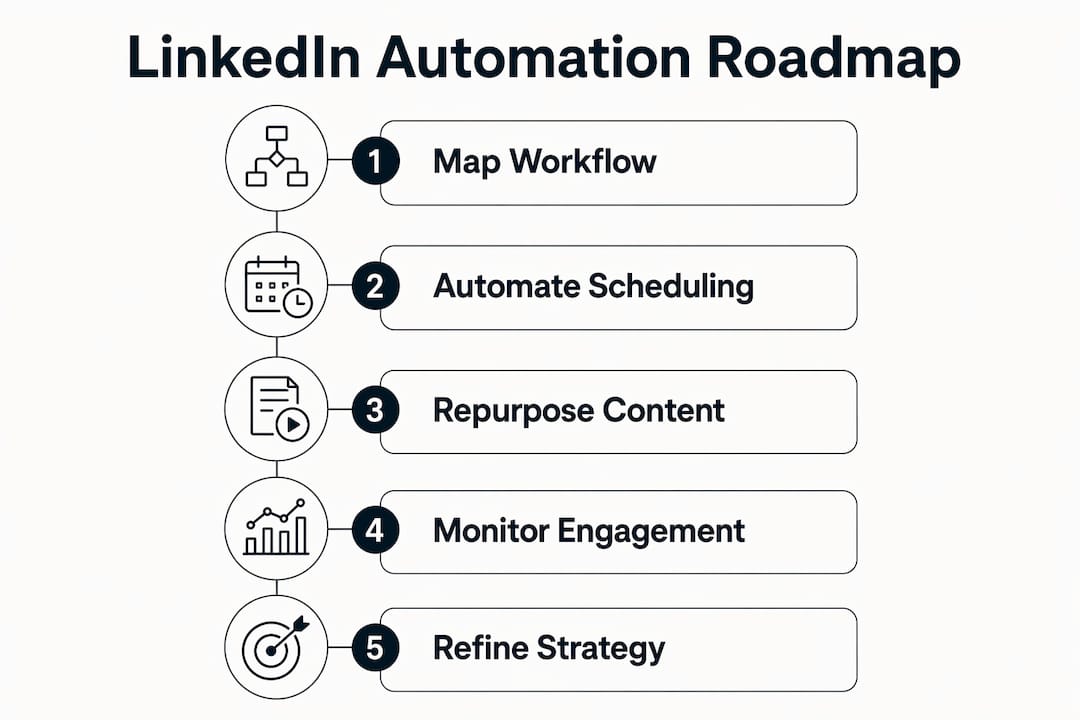
How to map your LinkedIn workflow before you automate anything
Rebuilding beats bolting on. Industry practitioners consistently advise mapping every step manually before adding AI - a one-hour setup that surfaces inefficiencies yields outsized returns compared to automating a broken process.
Run a 60 - 90 minute workflow audit:
- List every LinkedIn task: ideation, drafting, editing, formatting, scheduling, engagement follow-ups.
- Assign a time estimate and an owner to each task.
- Mark handoffs - where does work stall waiting for someone else?
- Flag tasks that are purely mechanical (formatting, copy/paste, posting) versus tasks that require your judgment.
Your process map should follow this spine:
- Seed content created (call transcript, long post, recorded demo)
- AI repurposes into platform-native derivatives
- Human review and light edit
- Schedule and publish
- Monitor engagement and log what worked
During the audit, track:
- Minutes per task
- Frequency per week
- Opportunity cost (your hourly rate × minutes spent)
A simple snapshot: if you spend 45 minutes on ideation, 90 minutes drafting, 20 minutes formatting, and 15 minutes scheduling each week, that’s 2.8 hours before you’ve written a single word of strategy. Most of those minutes are automatable. Mark them, then rebuild the workflow around what’s left.
What should founders automate on LinkedIn first?
Start with the tasks that eat the most time and require the least judgment. Automation handles mechanical work best when humans stay in the loop for strategy and voice.

| Task | Priority | Estimated time saved/week |
|---|---|---|
| Post scheduling and publishing | High | substantial time |
| Repurposing seed content into derivatives | High | substantial time |
| Idea surfacing from integrations | High | notable time |
| Basic formatting and hashtag optimization | High | moderate time |
| Approval routing for sensitive posts | High | moderate time |
| A/B headline testing | Medium | moderate time |
| Analytics-driven topic recommendations | Medium | notable time |
| Audience variation testing | Medium | moderate time |
| Automated replies requiring personalization | Low | minimal time |
| Complex multi-step outreach sequences | Low | minimal time |
Your MVP for weeks 1 - 2: scheduling, repurposing, and idea surfacing. Those three alone reclaim about 2 hours weekly with minimal setup risk. Add analytics automation in week 3 once the pipeline is stable.
How to feed AI your expertise instead of a blank page
Most successful founders use AI to multiply high-value source material rather than generate content from nothing. Blank-page AI output is generic. Source-fed AI output sounds like you.
What to feed the system:
- Call transcripts and recorded demos
- Notion project notes and product specs
- GitHub commit messages and release notes
- HubSpot customer win summaries and case study drafts
- Support tickets that reveal real customer language
- Past high-performing LinkedIn posts
Voice-training checklist:
- Collect your 10 best-performing posts and note what they have in common
- Write down 5 - 10 signature phrases or hooks you use naturally
- Document your formatting preferences (short paragraphs, no bullet walls, specific CTAs)
- Build a “lessons file” - a living document the AI ingests after each post, updated with what worked and what didn’t
Pro Tip: Use interviewer-persona prompts - ask the AI to play a journalist or mentor extracting your opinions on a topic. This removes blank-page weakness and produces drafts that actually sound like you said them out loud.
The practical workflow runs in three separate sessions: one for raw-source generation, one for editing, one for scheduling. Separating these sessions cuts context-switching and keeps your strategic thinking intact for the work that actually needs it.
Which integrations power personalized LinkedIn posts?
Integrations matter because they replace the “what should I post today?” question with a feed of real signals from your actual work. The HubSpot integration for content teams is a strong starting point for founders with active sales pipelines.
Key integrations and example triggers:
- Notion: New project note or completed PR → draft a behind-the-scenes post about the build process
- Slack: Team win posted in #wins channel → anecdote candidate for a LinkedIn story post
- GitHub: Merged PR or new release tag → short technical insight post for your developer audience
- HubSpot: Closed-won deal → customer story post draft with anonymized details
For data provenance, only pull from sources you own and control. Anonymize customer details before they enter any AI pipeline, and confirm your integration permissions cover the data types you’re extracting. Low-effort integrations (Notion, Slack via webhook) take under an hour to connect. GitHub and HubSpot integrations typically require 2 - 3 hours of configuration and testing.
How to keep LinkedIn automation safe and avoid account bans
LinkedIn’s algorithm flags accounts that post with robotic consistency or engage at inhuman speeds. The safe outreach practices Resonate enforces reflect what the platform’s terms actually penalize.
Essential guardrails:
- Set rate limits - no more than 1 - 2 auto-published posts per day
- Randomize posting times within a 2-hour window rather than posting at the exact same minute daily
- Require human approval for any post mentioning a specific person, client, or sensitive topic
- Avoid consecutive automated comments on the same thread
- Keep engagement automation conservative - likes and follows, not mass DM sequences
Pre-publish compliance checklist:
- Does the post contain any personal data that wasn’t explicitly cleared for public use?
- Has a human reviewed the tone for the current news context?
- Is the posting cadence within your configured daily limit?
- Does the content match the voice profile, or has it drifted?
Note: handling personal data in automated pipelines may carry obligations under applicable privacy law - confirm your setup with a qualified professional for your specific situation.
How do you measure ROI from LinkedIn content automation?
Core metrics to track:
- Founder hours saved per week (baseline vs. post-setup)
- Assets produced per seed piece
- Engagement per hour of founder time invested
- Cost per published asset (tooling + editing time)
- Conversion lift on lead-gen posts over a 60-day window
Sample calculation: One seed piece (90 minutes of founder time) produces 12 derivative posts via repurposing. At 5 minutes of editing per post, total time is 90 + 60 = 2.5 hours for 12 pieces. Without automation, 12 posts at 45 minutes each = 9 hours. Time saved: 6.5 hours per repurposing cycle.
| Phase | Timeline | What to expect |
|---|---|---|
| Setup | Days 1 - 30 | Workflow mapped, 1 - 2 integrations live, first seed piece queued |
| Ramp | Weeks 2 - 4 | Repurposing pipeline running, approval workflow active |
| Steady state | Days 30 - 60 | Analytics stabilizing, voice model improving, ~2 hrs/week founder time |
| Optimization | Days 60 - 90 | A/B data informing topics, cadence scaled, ROI measurable |
Tooling costs vary by platform tier. Factor in integration setup time (typically 3 - 8 hours one-time) and ongoing editing (roughly 5 minutes per post). Success looks like a consistent weekly cadence, rising engagement per post, and LinkedIn visibility compounding over 60 - 90 days.
What does a 30/60/90-day automation roadmap look like?
- Days 1 - 30: Run the workflow audit. Create your first seed piece. Connect Notion and one other integration. Automate scheduling and basic repurposing. Founder time budget: 3 - 4 hours/week during setup, dropping to about 2 hours by week 4.
- Days 31 - 60: Expand to GitHub and HubSpot integrations. Build the voice-training lessons file. Activate the approval workflow and configure safety rate limits. Assign a part-time editor for the 5-minute-per-post review pass. Founder time budget: about 2 hours/week.
- Days 61 - 90: Automate analytics recommendations. Test personalization triggers (closed deal → story post). Scale posting cadence. Measure ROI against the baseline from your audit. Founder time budget: about 2 hours/week.
| Role | Weekly time | Primary responsibility |
|---|---|---|
| Founder | about 2 hrs | Seed content, final approval on sensitive posts |
| Editor / ops | 2 - 3 hrs | Post review, voice-fidelity check, scheduling confirmation |
| Part-time contractor | 1 - 2 hrs | Integration maintenance, analytics review |
Checkpoint activities each week: review the post queue (15 min), check engagement metrics (15 min), update the lessons file with one observation (10 min).
Key Takeaways
Content automation saves founder time on LinkedIn by converting one seed piece into a week of scheduled output, cutting weekly content work to about 2 hours after a clean workflow rebuild.
| Point | Details |
|---|---|
| Rebuild before automating | Map every LinkedIn task manually first; AI on a clean process outperforms AI on a broken one. |
| Repurposing is the biggest lever | One seed piece produces 12 - 20 derivative posts, saving roughly 6+ hours per repurposing cycle. |
| Feed AI first-party material | Call transcripts, Notion docs, and HubSpot wins produce authentic output; blank-page prompts don’t. |
| Safety guardrails are non-negotiable | Rate limits, randomized timing, and human approval protect your account and your brand voice. |
| Resonate centralizes the workflow | Resonate connects Notion, Slack, GitHub, and HubSpot in one platform with built-in voice calibration and safe publishing controls. |
The tradeoffs founders should actually expect
Speed and personal touch pull in opposite directions, and pretending otherwise sets founders up for disappointment. Automation genuinely reclaims hours - the repurposing math is real, and the scheduling relief is immediate. But the tradeoffs are equally real.
Your editing time doesn’t disappear; it shifts. Instead of drafting from scratch, you’re reading AI output and correcting tone drift - a faster task, but still a task. Voice fidelity degrades gradually if you stop updating the lessons file. A post that sounded like you in week 2 can sound generic by week 8 if the model isn’t refreshed with new examples and feedback.
The founders who get the most from automation treat it as a multiplier, not a replacement. They stay in the loop on every post that touches a client relationship or a sensitive topic. They review the lessons file monthly. And they accept that content automation for startups requires an upfront investment of 3 - 8 hours before the savings kick in - it’s not a one-click fix.
The honest benchmark: if you’re not willing to spend 90 minutes on a solid seed piece, the derivatives will be thin. Automation scales quality up or down, not sideways.
Resonate turns this workflow into a single platform
Founders who want the workflow described above without stitching together five separate tools should look at Resonate. The platform generates LinkedIn-native posts calibrated to your voice, pulls ideas from Notion, Slack, GitHub, and HubSpot, and enforces configurable rate limits and approval workflows so your account stays safe.
Voice calibration trains on your past posts and source material - not a generic style template. The analytics layer improves recommendations over time, so the system gets more accurate the longer you use it. Community boosts amplify reach immediately after publication, and the MCP API gives advanced users direct pipeline access for custom workflows.
Setup takes under an hour for the core configuration. Most founders reach the about 2-hours-per-week steady state within 30 days. See how Resonate compares to other LinkedIn content generators and decide whether it fits your stack.
Useful sources and further reading
- How to Build a Content Engine That Runs Without You - best source for time-savings benchmarks and setup estimates
- How I AI: How the Founder of Morning Rebuilt Workflows - practitioner detail on lessons files, voice training, and workflow-first thinking
- AI Content Repurposing: Turn One Piece Into Twenty - repurposing math and waterfall workflow mechanics
- The Content Bottleneck: How AI Automation Freed 30 Hours a Week - SaaS team case example for time-savings evidence
- What Is Content Automation? A Simple Guide for Marketers - grounding on human-in-the-loop and approval workflow design
- Build a Content Machine, Not a Content Panic Room - session-separation and context-switching guidance
- AI Digital Marketing Strategies That Drive Real ROI - broader AI marketing ROI frameworks for implementation context
Recommended

Content Writer @ Resonate
Charlotte explores LinkedIn content, personal branding, AI writing, and founder-led marketing at Resonate. She believes the best content comes from real experience, not generic advice, and writes practical insights to help founders turn what they already know into content that people want to read.
Write LinkedIn content that sounds like you
with Resonate's AI Voice Engine