How GitHub and Slack Data Fuel Post Ideas for Marketers
How GitHub and Slack Data Fuel Post Ideas for Marketers

Your best LinkedIn content is already written. It’s sitting in commit messages, merged PRs, and Slack threads where your team just solved something real. The play is simple: capture commits, releases, and Slack questions within 30 minutes, reframe them for your audience, and run them through an AI-drafted/human-approved pipeline. That’s how GitHub and Slack data fuel post ideas that actually land.
TL;DR - three signals worth watching right now:
- Commits and PR merges: Every
feat:orfix:commit is a user-visible outcome waiting to be reframed. - Slack questions and feature requests: Real buyer language, surfaced daily, no research required.
- Cross-source product-change moments: When a GitHub release and a Slack customer question align, you have a post that writes itself.
How GitHub and Slack data fuel post ideas better than any external feed
External social feeds are noisy. GitHub and Slack are structured. A commit carries a timestamp, an author, a diff, and a message. A Slack thread carries the exact words a customer used to describe their problem. Neither requires you to invent a topic or guess what your audience cares about.
The signal-to-noise advantage is real: clustering signals by workflow wedge (migration pain, integration friction, wins) surfaces higher-quality post ideas than scrolling Twitter for inspiration. Slack captures intent in the buyer’s own words, which is gold for both SEO resonance and authentic storytelling.
The timing rule matters more than most teams realize. According to the GitHub to Content Pillar Guide, waiting past 30 minutes after a commit lands raises the cost of creating a post roughly tenfold. The context is fresh, the emotion is real, and the reframe takes seconds rather than minutes.
Why these two sources beat opinion channels:
- GitHub metadata (timestamps, diffs, PR descriptions) makes signal detection repeatable and automatable.
- Slack threads surface the exact objections and questions your buyers are asking right now.
- Both are internal, so the content is original by definition - no one else is writing from your repo.
What GitHub signals should you watch, and what posts do they map to?
The Pillar Guide recommends converting roughly 20 - 30% of commits in a healthy repo. Converting under 10% starves your calendar; converting everything creates spam.
High-value GitHub events and their post ideas:
feat:commits that close a user-visible loop. Post idea: “We just shipped [feature]. Here’s the problem it solves and why it took us three tries.”fix:commits with a story. Post idea: “A bug that affected [X behavior] taught us something about [underlying assumption]. Thread.”- Merged PRs answering a feature request. Post idea: “A customer asked for this six months ago. Here’s what we built and what we learned.”
- Version releases and changelogs. Post idea: “What’s new in v2.4 - and why the boring items matter most.”
- First deploy of a major change. Post idea: “We just flipped the switch on [architecture change]. Here’s what it means for you.”
- Contributor activity. Post idea: “Meet the engineer who quietly fixed the thing everyone complained about.”
Pro Tip: When translating a commit message into a post, ask one question: “What can the user do now that they couldn’t do before?” That reframe converts a technical diff into a reader-facing outcome every time.
Which Slack signals reliably convert to social posts?
Slack is a live feed of your customers’ actual problems. The trick is capturing signals before they scroll away.
Slack signal types and example post hooks:
- Repeated questions in support or community channels. Hook: “Three people asked this in one week, so here’s the full answer.”
- Feature-request threads. Hook: “This request came up again. Here’s our thinking on why we haven’t built it yet.”
- Post-mortem or incident threads. Hook: “We had an outage. Here’s what broke, what we did, and what we changed.”
- Short-form wins. Hook: “A customer just hit [milestone]. Here’s what they did differently.”
- Emoji reactions as signal flags. A or reaction on a message can trigger an agent to draft a post automatically.
- Cross-team debates. When product and engineering disagree publicly in Slack, that tension is a post about real tradeoffs.
The safest pickup pattern uses a single emoji as a manual flag that an AI agent monitors. When a team member reacts with the designated emoji, the agent queues a draft. Nothing goes public without human review, and internal jargon never leaks.
Pro Tip: Create a #content-fuel channel and forward any Slack message worth revisiting. Add a one-line angle note (“Angle: onboarding friction for new accounts”) so the context survives when you review it Friday morning.

How do you cluster signals into repeatable editorial themes?
Raw signals are not posts. They become posts when you group them into editorial “wedges” - recurring themes that build authority over time. The LaunchKit framework calls this “clarity of signal over raw volume.”
Core editorial wedges for a dev-tool or SaaS team:
- Migration pain: Commits and Slack threads about moving from one system to another.
- Integration friction: PRs and questions about connecting your product to other tools.
- Wins and metrics: Customer milestones, usage records, performance improvements.
- How-tos and debugging stories: Fix commits and support questions with a teachable moment.
- Product tradeoffs: Design decisions, rejected PRs, and the reasoning behind them.
- Contributor spotlights: First-time contributors, long-running maintainers, community members.
| Event type | Wedge | Headline angle | Cadence |
|---|---|---|---|
feat: commit |
How-to | “How we built [X] and what it unlocks” | 2x/week |
| Support question (repeated) | Migration pain | “The question we get every week about [Y]” | 1x/week |
| Merged feature-request PR | Wins | “You asked. We shipped. Here’s what changed.” | 1x/week |
| Post-mortem thread | Debugging story | “What broke, what we learned, what we changed” | As needed |
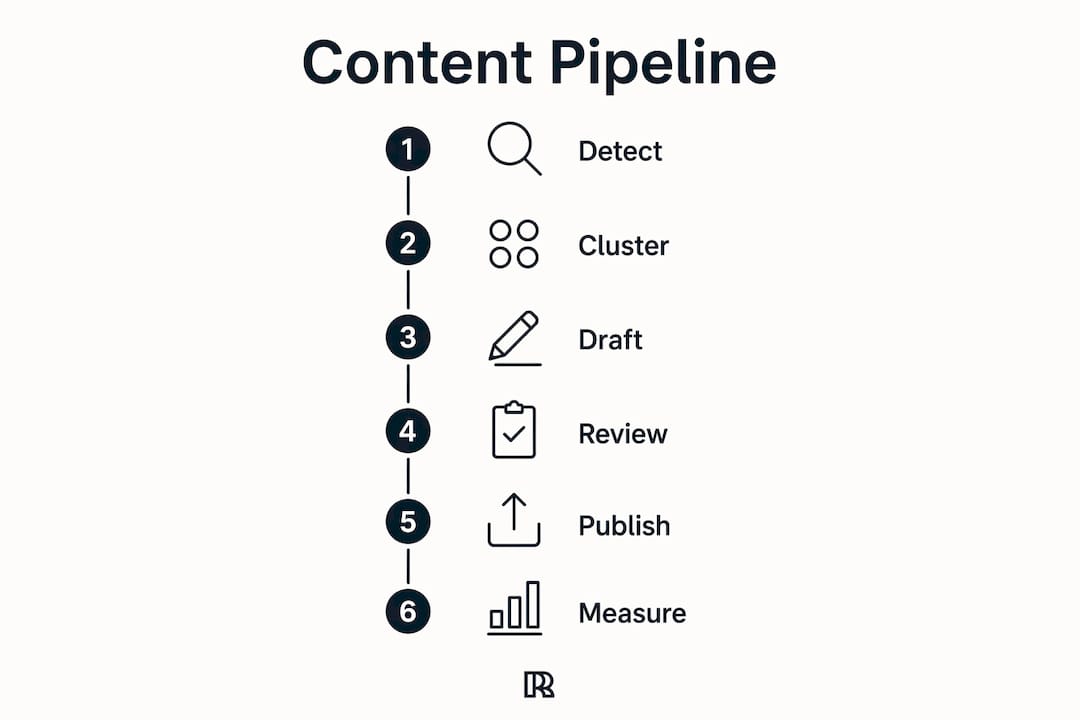
What does the detect-to-publish pipeline actually look like?
AI agents that own the full content lifecycle - from draft to calendar to publish to marking tickets as shipped - cut coordination overhead for lean teams. Here’s the four-stage pipeline:
- Detect. A GitHub webhook fires on push or PR merge. A Slack Events API listener watches for the designated emoji flag or keyword pattern.
- Draft. The agent pulls the commit message or Slack thread, applies your voice profile, and generates a LinkedIn post draft in under 60 seconds.
- Vet. A human reviewer reads the draft in 30 - 60 seconds, adjusts the reframe if needed, and approves or rejects. This is the only step that requires human time.
- Publish. The approved post goes to a scheduling queue or publishes immediately, depending on the timing rules you set.
The 30-minute rule is the most important SLA in this pipeline. The Pillar Guide shows that Level 3 automation (AI-drafted, human-approved) produces a 70 - 80% conversion rate of content-worthy commits. Miss the window and that rate drops sharply as context fades.
Pre-publish QA checklist:
- No internal project names, client names, or PII visible.
- The reframe is user-facing, not engineer-facing.
- The post stands alone without requiring the reader to know your codebase.
Pro Tip: Set a Slack notification that fires the moment a draft enters the review queue. A 30-second approval on mobile beats a 30-minute desktop review session every time.
What tools and integrations run this pipeline safely?
The full-lifecycle agent approach works across several tooling layers. Here’s how they fit together:
- GitHub API and webhooks: Trigger on push, pull_request, release, and issues events. Filter by branch and label to avoid noise from internal branches.
- Slack Events API: Subscribe to
message.channelsandreaction_addedevents. Use app-level tokens with the minimum scopes required. - GitHub Actions: Run classification scripts in-repo on every merge to main. Output a JSON payload to your draft queue.
- Zapier or Make: No-code routing between GitHub/Slack events and your draft tool or CMS. Good for teams without a dedicated engineer.
- Resonate: Connects directly to Slack and GitHub, surfaces post ideas, applies your voice profile, runs multi-agent critique, and schedules posts with publishing guardrails that prevent account bans.
Privacy and security guardrails:
- Use least-privilege tokens. A webhook token that can only read push events cannot leak repo secrets.
- Anonymize customer names and internal project codenames before any draft leaves the pipeline.
- Flag ambiguous content (incident threads, client-specific details) for human review rather than auto-drafting.
- Build and test in a sandbox Slack workspace before connecting to production channels.
Pro Tip: Store webhook secrets in environment variables, never in the repo. Rotate tokens quarterly and audit scope permissions whenever you add a new integration.
How do you measure whether the pipeline is working?
Track the pipeline at three levels: conversion, engagement, and growth.
- Conversion rate: What percentage of flagged signals become published posts? A healthy pipeline converts 20 - 30% of flagged events. Below 10% means your filter is too strict; above 60% means you’re publishing noise.
- Engagement per post: Likes, comments, shares, and saves. Authentic posts sourced from real work tend to outperform generic thought-leadership content because the specificity is visible.
- Follower growth rate: A lagging indicator, but a steady upward trend over 60 - 90 days confirms the signal-to-post approach is building authority.
For LinkedIn distribution, experiment with cadence (3 vs. 5 posts per week) and signal source (GitHub-heavy vs. Slack-heavy weeks) to find the mix that drives the most meaningful engagement for your audience.
Ready-to-use LinkedIn post templates and LLM prompts
Four adaptable LinkedIn templates:
- Lesson post: “We spent [time] on [problem]. Here’s the one thing that actually fixed it: [user-visible outcome]. [2-3 sentence explanation]. What’s your experience with [related challenge]?”
- Behind-the-scenes: “Here’s what [feature/fix] looks like from the inside. [Brief technical context]. What it means for you: [user-visible outcome].”
- Bug story: “We shipped a bug last [day]. [One sentence on what broke]. Here’s what we learned: [lesson]. [One sentence on the fix].”
- Release announcement: “[Version] is live. The headline change: [user-visible outcome]. The one we’re most proud of: [specific detail].”
LLM prompt for a commit: LLM prompt for a Slack thread:
A 6-step pipeline you can run this week
- Pick one repo and one Slack channel. Start narrow. One active repo and your busiest support or community channel.
- Set up event detection. Add a GitHub webhook on
pushandpull_requestevents. Add a Slack emoji flag (try ) that your team uses to mark post-worthy messages. - Route events to a draft queue. Use Zapier, GitHub Actions, or Resonate’s native integration to send flagged events to a shared draft inbox.
- Generate AI drafts. Apply your voice profile. Each draft should take under 60 seconds to generate.
- Human review in 30 - 60 seconds. One person approves, edits, or rejects. No committee. No async thread.
- Publish and track. Schedule or post immediately. Log the signal source so you can trace which events drive the best engagement.
Roles and SLAs:
- Signal flagging: Anyone on the team, real-time.
- Draft review: One designated reviewer, within 30 minutes of the event.
- Publishing: Automated after approval, or manual if you prefer.
- Weekly review: 20 minutes to check conversion rate and engagement, adjust filters.
For teams that want to repurpose GitHub and Slack stories into video or short clips, the same draft can seed a script with minimal additional effort.
When should you post? Timing posts to your project lifecycle and Slack peaks
Post timing tied to your internal rhythm outperforms generic “best time to post” advice. A release post published the same day a version ships carries more credibility than a scheduled post later.
Practical timing rules:
- Post within 30 minutes of a significant merge or release. The context is freshest, the team is energized, and the post reads like it came from someone who was there.
- Watch Slack activity peaks. Most teams see a surge of questions Monday morning and Thursday afternoon. Those peaks signal what your audience is struggling with right now.
- Align post cadence with sprint cycles. End-of-sprint weeks generate more content-worthy events. Plan for 4 - 5 posts those weeks and 2 - 3 during quieter stretches.
- Use incident threads as delayed posts. Post-mortems need 24 - 48 hours before going public. The delay is worth it; incident transparency posts consistently drive high engagement.
Key Takeaways
GitHub and Slack are the highest-signal, lowest-effort content sources available to any technical team - and a 30-minute capture window is the single variable that separates teams that publish consistently from those that don’t.
| Point | Details |
|---|---|
| 30-minute capture rule | Draft posts within 30 minutes of a commit or Slack event; waiting longer raises creation cost roughly tenfold. |
| Signal conversion target | Convert 20 - 30% of flagged events to published posts; below 10% starves your calendar, above 60% creates noise. |
| Editorial wedges | Cluster signals into themes (migration pain, wins, how-tos) to build repeatable, authority-building content. |
| Privacy guardrails | Anonymize names and internal details before any draft leaves the pipeline; route ambiguous content to human review. |
| Resonate | Connects Slack and GitHub natively, applies voice calibration, runs multi-agent critique, and publishes with ban-safe guardrails. |
The ethics of mining internal signals for public content
The most underrated risk in this pipeline is not a bad post. It’s a post that was technically fine but eroded trust with your team or your customers because it felt like surveillance.
The line between “building in public” and “exposing private conversations” is thinner than most content guides admit. A Slack thread where a customer vented about a bug is not a content asset until that customer would recognize their words in your post and feel proud, not exposed. Anonymization is not optional - it’s the minimum. Remove names, company references, and any detail that narrows the field to one person.
The same logic applies to GitHub. A contributor’s first commit is a story worth telling, but only if they’d want it told. Ask. The 30 seconds it takes to get a thumbs-up is worth more than the post.
Resonate’s voice calibration and publishing guardrails exist precisely because automation without judgment is the fastest way to publish something you’ll regret. The AI-drafted/human-approved model keeps a human in the loop at the moment it matters most: before anything goes public. That’s not a workflow inefficiency. It’s the feature.
Resonate turns this pipeline into a one-click workflow
If you’ve read this far, you have the blueprint. The gap between knowing the pipeline and running it daily is usually one thing: the friction of stitching tools together yourself.
Resonate connects directly to your Slack and GitHub, surfaces the post ideas worth acting on, drafts them in your voice, and runs each draft through multi-agent AI critique before it reaches your review queue. Publishing guardrails prevent account bans. Voice calibration means the posts sound like you wrote them, because the model trained on your writing.

For solo professionals and lean teams, it’s the difference between a pipeline that runs and one that sits in a Notion doc. Start a 14-day free trial at Resonate.ai/features and connect your first repo or channel today.
Research and further reading
- GitHub to Content: The 2026 Pillar Guide - the source for the 30-minute rule, Level 3 automation, and signal conversion benchmarks.
- How Lean Teams Run a Full Content Operation from Slack with AI Agents - full-lifecycle agent ownership and coordination overhead reduction.
- Startup Ideas From Hacker News and GitHub: A Source-Based Research System - editorial wedge clustering and business-filter methodology.
- Automated Content Pipeline: Community Data and Buffer API - emoji-flag pickup patterns and editorial control mechanisms.
- GitHub Trending to Product Ideas: Automated Market Signal Pipeline - dedupe, classification, and scoring for multi-source pipelines.
- GitHub REST API documentation - webhook event types, authentication, and least-privilege token setup.
- Slack API documentation - Events API subscriptions,
reaction_addedevents, and app-level token scopes. - How to Automate Content Publishing Workflows with OpenClaw in Slack - concrete skill definitions for multi-step publishing automation.
Recommended

Content Writer @ Resonate
Charlotte explores LinkedIn content, personal branding, AI writing, and founder-led marketing at Resonate. She believes the best content comes from real experience, not generic advice, and writes practical insights to help founders turn what they already know into content that people want to read.
Write LinkedIn content that sounds like you
with Resonate's AI Voice Engine