Best Postiv.ai Alternatives for Professionals and Marketers
Best Postiv.ai Alternatives for Professionals and Marketers

If you need one answer fast: Resonate is the strongest Postiv.ai alternative for professionals and marketing teams who care about voice-calibrated LinkedIn content, safe publishing via the native LinkedIn API and MCP API, and deep integrations with tools like Notion, Slack, and HubSpot. It’s not just another AI writer. It trains on your actual writing patterns, critiques drafts before they go live, and connects to your existing work stack to surface post ideas automatically. If you want to try this yourself, spin up a draft with Resonate's LinkedIn content generator.
That said, the right choice depends on what you’re actually missing from Postiv.ai. Here’s a fast shortlist by use case:
- Best overall (voice-first LinkedIn platform): Resonate. Voice calibration, ban-safe API publishing, multi-account agency features, and a free trial period with a money-back guarantee.
- Best for carousel and visual posts: Visual-first builders like Canva (with AI features) or dedicated carousel tools that pair design templates with AI copy.
- Best budget option: Freemium AI writers (Buffer, FeedHive entry tiers) that handle basic scheduling and post drafting without a monthly commitment.
- Best for enterprise and agency teams: Platforms with white-label reporting, seat management, and dedicated onboarding. Resonate’s agency plan covers this; so do enterprise tiers of larger social management suites.
Pro Tip: Before trialing anything, confirm whether the tool publishes via the native LinkedIn API or a browser extension. Extension-based posting is more likely to break, trigger rate limits, or flag your account. This single check eliminates half the field immediately.
Platforms that invest in voice calibration and long-term memory consistently produce more on-brand posts over weeks compared with generic one-off AI writers. That’s the core reason Resonate leads this list.
How do the main Postiv.ai alternative categories compare on features?
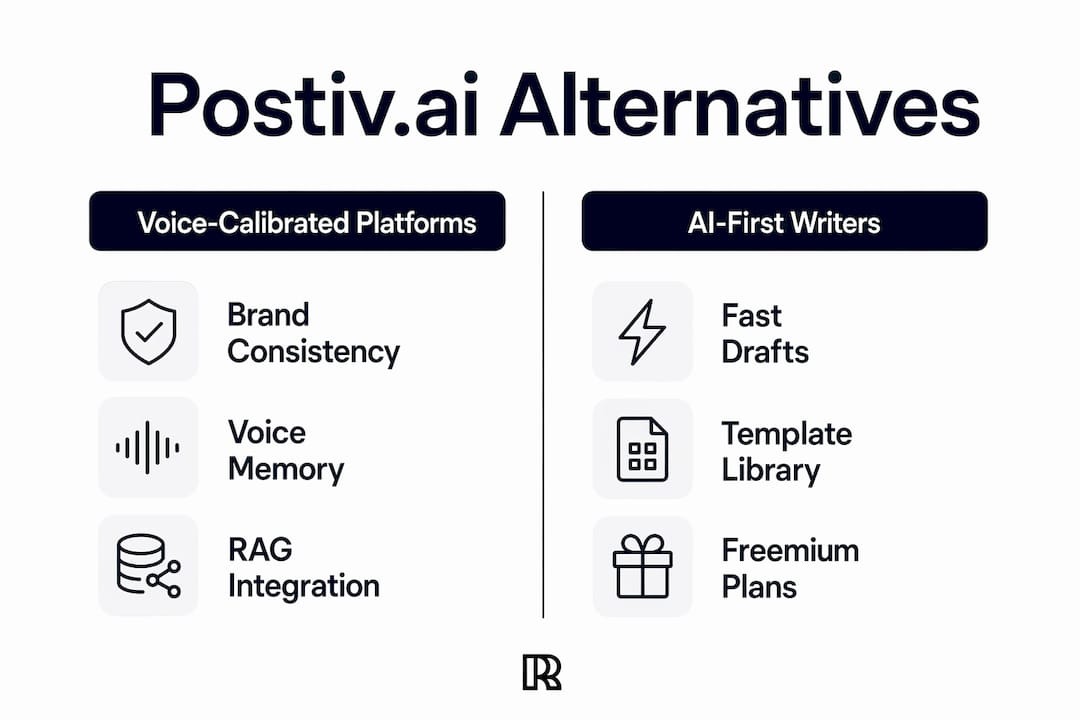
The tools competing in this space fall into four distinct categories, and category framing helps you narrow options faster than comparing brand-to-brand feature lists. Here’s how they stack up on the dimensions that actually matter for LinkedIn workflows.
| Category | Best for | Voice/persona & memory | RAG & integrations | Carousel/visual | Scheduling (API vs extension) | Team & multi-account | Analytics & prediction | Pricing & trial | Safety/guardrails |
|---|---|---|---|---|---|---|---|---|---|
| Voice-calibrated platforms (e.g., Resonate) | Professionals, agencies, content-ops teams | ✅ Deep voice training + long-term memory | ✅ Notion, Slack, HubSpot, GitHub, Google Drive | ⚡ Partial (text-first, some visual) | ✅ Native LinkedIn API + MCP API | ✅ Multi-account, white-label | ✅ AI critique agents + predictive scoring | Paid plans starting from a monthly subscription, with a trial period available | ✅ Guardrails, configurable limits |
| AI-first LinkedIn writers (e.g., Supergrow, Taplio, Scripe, MagicPost, UpLinked, Phantomwriter, Ghostwriter, Flow OS) | Solo creators, individual professionals | ⚡ Basic persona settings | ⚡ Limited (some Google Drive) | ⚡ Some carousel support | ⚡ Mixed (API or extension varies) | ⚡ Limited (mostly solo) | ⚡ Basic engagement metrics | Freemium | ⚡ Varies widely |
| Social management suites (e.g., Buffer, Hootsuite, FeedHive) | Multi-channel social teams | ❌ Minimal voice training | ⚡ Some CRM integrations | ⚡ Partial | ✅ Native API (LinkedIn supported) | ✅ Team seats, approval flows | ⚡ Basic analytics | Freemium to enterprise | ✅ Generally safe (API-based) |
| Visual/carousel builders (e.g., Canva, Oiti) | Design-led content teams | ❌ No voice memory | ❌ Minimal | ✅ Strong carousel/visual | ⚡ Manual or extension | ⚡ Limited | ❌ Minimal | Freemium tiers up to low-cost monthly subscription plans | ⚡ Depends on posting method |
Legend: ✅ Native/full support · ⚡ Partial/varies · ❌ Not available
A few things worth calling out directly. Native LinkedIn API publishing is the clearest safety signal in this table. Social management suites and voice-calibrated platforms like Resonate use it; many AI-first writers rely on browser extensions, which can break with LinkedIn updates or trigger account flags. Second, agency and multi-account management is consistently an enterprise-tier feature. If you manage five or more LinkedIn profiles, budget for a higher plan regardless of which category you choose.
- The cheapest category is typically freemium AI writers, with usable free tiers for solo users.
- Enterprise onboarding with dedicated support is usually required for white-label agency plans, regardless of platform.
What does each alternative category actually deliver for LinkedIn?
1. Voice-calibrated platforms (Resonate and similar)
This is the category that most directly replaces what Postiv.ai-style tools promise but often underdeliver on: content that actually sounds like you. Resonate trains on your writing patterns, ingests documents and data from Notion, Slack, HubSpot, GitHub, and Google Drive via RAG, and surfaces post ideas from your real work. AI critique agents score drafts before publishing. Scheduling goes through the native LinkedIn API, not a browser extension.
Best for: Professionals, consultants, and agency teams who post consistently and need content that holds up to scrutiny from their actual audience.
Typical pricing: Paid plans starting at a moderate monthly subscription with a trial period and money-back guarantee. Agency plans include white-label reporting and seat management.
Pros: Deep voice fidelity over time, ban-safe publishing, strong integrations, multi-account support, AI critique before posts go live.
Cons: Higher starting price than freemium options; onboarding takes a few sessions to calibrate voice properly.
Example workflow: A content manager connects Resonate to their company Notion workspace on Monday. By Tuesday, the platform has surfaced five post ideas from recent project notes. They draft, run through the AI critique agent, schedule via LinkedIn API, and publish Thursday. Total active time: under 45 minutes for the week.
2. AI-first LinkedIn writers (Supergrow, Taplio, Scripe, MagicPost, UpLinked, Phantomwriter, Ghostwriter, Flow OS)
These tools focus on generating LinkedIn post copy quickly, often with templates, hooks, and post-type selectors. Supergrow and Taplio are among the more established names here; Scripe, MagicPost, UpLinked, Phantomwriter, Ghostwriter, and Flow OS occupy the mid-market. Most offer a freemium tier or a short trial. Voice settings exist but are typically shallow: you pick a tone or upload a few sample posts, and the tool approximates your style without true long-term memory.

Best for: Solo professionals who need volume and speed, and aren’t yet worried about deep brand consistency.
Typical pricing: Freemium entry points; paid tiers available at various monthly rates for features like scheduling and analytics.
Pros: Fast drafts, low barrier to entry, good template libraries.
Cons: Voice drift over time, limited integrations, scheduling reliability varies (check whether it’s API or extension), minimal team features.
Example workflow: A freelance consultant uses an AI-first writer to generate ten post variations from a single prompt each Monday, picks the best three, and schedules them manually. Quick, but requires weekly re-prompting to stay on-brand.
3. Social management suites (Buffer, Hootsuite, FeedHive)
Buffer, Hootsuite, and FeedHive are built for multi-channel social publishing first, with AI writing features added on top. They’re genuinely strong on scheduling reliability (native LinkedIn API), team approval workflows, and analytics. What they lack is any meaningful voice calibration or document-based content sourcing. They’re not trying to sound like you; they’re trying to get your posts out on time across five platforms.

Best for: Social media managers running multi-channel programs who need LinkedIn as one channel among many.
Typical pricing: Freemium tiers available; team plans with pricing varying by seats and features.
Pros: Proven scheduling infrastructure, team collaboration, multi-platform support, safe API publishing.
Cons: Generic AI writing, no voice memory, limited LinkedIn-specific features, not built for personal brand content.
Example workflow: A social media manager uses a suite to schedule LinkedIn posts alongside Twitter/X and Instagram content, with a team approval step before anything goes live. The AI writing assist generates a first draft; a human rewrites it entirely.
4. Visual and carousel builders (Canva, Oiti)
Visual carousel support is a distinct capability that text-first AI writers don’t bundle well. Canva’s AI features and tools like Oiti are built for design-led LinkedIn content: multi-slide carousels, branded templates, and visual storytelling. They don’t train on your voice, and publishing to LinkedIn usually requires a manual step or a third-party scheduler.
Best for: Content teams where visual design is the primary differentiator and carousel engagement is a core KPI.
Typical pricing: Canva free tier available; Canva Pro around $15/month. Oiti pricing varies.
Pros: Strong design output, carousel-native workflows, brand kit support.
Cons: No voice memory, no RAG integrations, posting is manual or requires a separate scheduler, no LinkedIn-specific analytics.
Example workflow: A marketing team designs a five-slide carousel in Canva, exports it, and uploads it manually to LinkedIn or via a connected scheduler. The AI writing assist generates the caption; a human edits for tone.
Pro Tip: If carousels are a significant part of your LinkedIn strategy, pair a visual builder with a voice-calibrated platform for the text layer. The two categories complement each other rather than compete.
What should you expect to pay, and what do trials actually cover?
Most alternative tools offer freemium plans or limited free trials, but premium capabilities like multi-account management, long-term memory, and API-based publishing sit behind paid tiers.
| Category | Starting price | Free tier / trial | Enterprise model | Self-serve? |
|---|---|---|---|---|
| Voice-calibrated platforms (Resonate) | Moderate monthly subscription | Trial period with money-back guarantee | Agency plan: platform fee + client seats | Yes |
| AI-first LinkedIn writers | Freemium plans and paid tiers available | Freemium or 7-day trial | Seat-based upgrades | Yes |
| Social management suites | Freemium tiers and some paid plans available | Freemium | Enterprise: custom pricing, dedicated support | Yes (enterprise: sales-led) |
| Visual/carousel builders | Freemium tiers and some paid plans available | Freemium | Team plans, brand kits | Yes |
A few hidden costs to watch for across all categories:
- Content credits: Some AI writers cap monthly post generations on lower tiers. Exceeding the cap means upgrading or paying per post.
- Extra seats: Team features almost always cost more. Budget for at least two seats if you have a writer and an approver.
- Advanced integrations: Notion, HubSpot, and Salesforce connections are often paid-only features, even when the base plan looks affordable.
- Dedicated onboarding: Agency and enterprise plans frequently require a paid onboarding session or a minimum contract term.
During a trial, verify LinkedIn publishing safety on day one. Connect a test LinkedIn account (not your primary), publish one post, and confirm it went through the native API rather than a browser extension. This single step tells you more about long-term account safety than any feature checklist.
How we compared these tools
Evaluating LinkedIn content tools requires more than reading feature pages. Here’s the framework used to build this comparison.
- Content quality and voice fidelity: Does the output actually sound like the user after calibration, or does it default to generic LinkedIn-speak?
- Voice/persona memory: Does the platform retain and improve its model of your voice over weeks, or does each session start fresh?
- RAG and document ingestion: Can the tool pull from Notion, Slack, HubSpot, Google Drive, or GitHub to surface contextually relevant post ideas?
- LinkedIn publishing reliability: Does it use the native LinkedIn API, or a browser extension? Was this verified with a test account?
- Integrations: Depth and breadth of connections to common work tools.
- Scheduling: Reliability, queue management, and time-zone support.
- Analytics: Basic metrics vs. predictive scoring vs. AI critique agents that score drafts before publishing.
- Team features: Seat management, approval workflows, multi-account support, white-label reporting.
- Safety guardrails: Configurable posting limits, ban-risk signals, and compliance with LinkedIn’s terms.
- Onboarding effort: Time to first useful draft, documentation quality, and support responsiveness.
- Pricing and trial verification: Self-serve sign-ups were tested; trial periods and feature gates were confirmed directly.
This comparison focuses on the U.S. market. Test accounts were used for publishing verification; no deep security audits were conducted. Pricing reflects publicly listed rates at the time of writing and may change.
“The most actionable item during any short pilot is verifying whether a platform uses the LinkedIn API or relies on a browser extension. This single check determines both safety and long-term scheduling reliability - and it takes less than five minutes to confirm.” - Testing methodology note
How do you pick the right Postiv.ai alternative for your team?
Start with three questions: How important is voice consistency to your LinkedIn strategy? Do you manage one account or many? And what’s your tolerance for onboarding effort?
Decision checklist for your trial:
- Confirm the tool publishes via the native LinkedIn API (not a browser extension).
- Test voice/persona memory: write ten posts over five days and check whether the output drifts from your calibrated style.
- Verify RAG and document ingestion: connect one work tool (Notion or Google Drive) and confirm the platform surfaces relevant post ideas from it.
- Check scheduling reliability: schedule three posts across different time slots and confirm delivery without manual intervention.
- Validate team seats: add a second user and test the approval workflow end-to-end.
- Export analytics: confirm you can pull engagement data in a format your team can actually use.
Questions to ask vendors on a sales call:
- Which LinkedIn API version do you use, and how do you handle API changes?
- Where is user data hosted, and is U.S.-based hosting available?
- What’s the onboarding timeline for an agency plan?
- Can we customize voice models per client account?
- What’s your support response time SLA for paid plans?
Red flags to walk away from:
- No native LinkedIn API (extension-only posting).
- No trial period or a trial that doesn’t include scheduling features.
- Opaque pricing with no self-serve option.
- No team management or approval workflow at any tier.
- Support response times over 48 hours on paid plans.
Suggested 7 - 14 day pilot plan:
Days 1 - 2: Set up a test LinkedIn account. Connect integrations. Calibrate voice with sample posts. Days 3 - 5: Generate five drafts. Run through any critique or scoring features. Schedule two posts via the API. Days 6 - 10: Review published posts. Check analytics. Add a second team member and test the approval flow. Days 11 - 14: Evaluate voice consistency, scheduling reliability, and integration depth. Make your go/no-go decision before the trial ends.
Per-tool mini-reviews: key features, best for, and trade-offs
Resonate
Resonate is built specifically for LinkedIn, not adapted from a general social scheduler. Voice calibration is the core feature: the platform trains on your writing samples and improves its model with every post. AI critique agents score drafts on engagement likelihood before you publish. Integrations cover Notion, Slack, HubSpot, GitHub, Salesforce, and Google Drive, with MCP API access for advanced workflows. Publishing goes through the native LinkedIn API.
Best for: Professionals, consultants, and agencies who need consistent, on-brand LinkedIn content at scale.
Pros: Deep voice fidelity, ban-safe publishing, strong integrations, community boost feature, white-label agency reporting.
Cons: Higher starting price than freemium tools; voice calibration requires an initial setup investment.
Supergrow
Supergrow is an AI-first LinkedIn writer with a clean interface and a solid template library. It’s popular among solo creators for its speed. Voice settings are available but don’t persist deeply across sessions. G2 reviews note strong output quality for hooks and short-form posts.
Best for: Solo professionals who need fast drafts and don’t require deep integrations.
Pros: Fast, good templates, freemium entry point.
Cons: Limited voice memory, no native LinkedIn API scheduling on lower tiers, minimal team features.
Scripe
Scripe positions itself as a personal brand tool with some voice-learning features. Trustpilot reviews for Scripe highlight ease of use and onboarding speed as strengths. It’s a reasonable starting point for professionals new to AI-assisted LinkedIn content.
Best for: Individuals building a personal brand who want a low-friction starting point.
Pros: Easy onboarding, decent voice approximation, clean UI.
Cons: Limited integrations, voice consistency degrades over longer time horizons.
MagicPost
MagicPost focuses on post generation speed with a prompt-in, post-out workflow. Trustpilot reviews for MagicPost mention fast output but note that posts often need significant editing to feel authentic.
Best for: Users who want a quick first draft to edit manually.
Pros: Fast, low cost, simple interface.
Cons: Minimal voice training, output often generic, no scheduling or analytics.
Taplio
Taplio is one of the more established AI-first LinkedIn tools, with a content inspiration feed, scheduling, and basic analytics. It’s a solid mid-market option for solo professionals who want more than a basic AI writer but don’t need agency-grade features.
Best for: Individual professionals who want scheduling plus AI writing in one tool.
Pros: Scheduling, content inspiration, reasonable analytics.
Cons: Voice calibration is shallow, no deep RAG integrations, extension-based publishing on some features.
Buffer
Buffer is a multi-channel social scheduler with AI writing assist added in recent updates. It’s not built for LinkedIn specifically, but its scheduling infrastructure is reliable and it uses the native LinkedIn API. The AI writing features are generic.
Best for: Social media managers running multi-channel programs who need LinkedIn as one channel.
Pros: Reliable scheduling, native API, team features, freemium tier.
Cons: No voice memory, generic AI writing, not LinkedIn-specific.
Hootsuite
Hootsuite is the enterprise-grade social management suite. It handles LinkedIn alongside every other major platform, with strong team workflows, analytics, and compliance features. The AI writing is OwlyWriter AI, which is competent but not voice-calibrated.
Best for: Enterprise social teams managing LinkedIn as part of a broader multi-channel program.
Pros: Enterprise-grade, strong analytics, team workflows, native API.
Cons: Expensive for LinkedIn-only use, no voice calibration, heavy onboarding.
Canva
Canva’s AI features (Magic Write, Magic Design) make it a strong option for carousel and visual LinkedIn content. It’s not a LinkedIn content platform; it’s a design tool that can generate captions. Publishing requires a manual step or a connected scheduler.
Best for: Teams where visual design is the primary LinkedIn differentiator.
Pros: Best-in-class visual output, carousel-native, freemium tier.
Cons: No voice memory, no scheduling, no LinkedIn analytics, manual publishing.
FeedHive
FeedHive is a content recycling and scheduling tool with AI writing features. Its standout capability is content recycling: it resurfaces and repurposes older posts automatically. Scheduling uses the native LinkedIn API.
Best for: Professionals with an existing content library who want to maximize post longevity.
Pros: Content recycling, native API scheduling, clean UI.
Cons: AI writing is basic, no voice calibration, limited integrations.
UpLinked, Phantomwriter, Oiti, Flow OS, Ghostwriter
These tools occupy the emerging end of the AI LinkedIn writer market. UpLinked and Phantomwriter focus on post generation with minimal scheduling. Oiti and Ghostwriter offer ghostwriting-style workflows for professionals who want AI to handle drafting entirely. Flow OS positions itself as a content operating system with LinkedIn as one output channel. All are worth a trial if you’re evaluating the AI-first writer category, but none offer the voice calibration depth or integration breadth of Resonate.
What kind of support and community can you expect?
Support quality varies sharply across these categories, and it’s one of the most underdiscussed factors in tool selection.
Voice-calibrated platforms like Resonate tend to offer structured onboarding, documentation, and responsive support because the product requires setup investment. Getting voice calibration right matters, so the support model reflects that. Resonate’s agency plan includes dedicated onboarding support.
AI-first LinkedIn writers vary widely. Supergrow and Taplio have active user communities and knowledge bases. Smaller tools in this category often rely on chat support with slower response times. Check response time SLAs before committing to a paid plan.
Social management suites like Hootsuite offer enterprise-grade support with SLAs, dedicated account managers, and training resources. Buffer’s support is solid for a freemium product. FeedHive has a growing community and responsive chat support.
Visual builders like Canva have extensive self-serve documentation and a large community, but support for LinkedIn-specific workflows is limited because LinkedIn isn’t their primary use case.
One practical note: community resources matter more than they seem. Platforms with active user communities (Slack groups, Discord servers, LinkedIn groups) give you access to real workflow tips, prompt libraries, and peer troubleshooting that documentation can’t replicate. Ask about community access during your trial.
How do these tools handle content quality and originality?
Generic AI output is the biggest risk in this category. Tools that generate LinkedIn posts from a single prompt without voice training tend to produce content that reads like every other AI-generated post on the platform: hook-heavy, list-driven, and instantly recognizable as machine-written.
The platforms that solve this problem do it through two mechanisms. First, voice calibration: training the model on your actual writing samples so output reflects your sentence structure, vocabulary, and perspective. Second, RAG (retrieval-augmented generation): pulling from your real work documents, meeting notes, or project updates so posts are grounded in specific, original ideas rather than generic takes.
Resonate combines both. The AI critique agents add a third layer: before a post goes live, the system scores it on engagement likelihood and flags anything that reads as generic or off-brand. That feedback loop is what separates a voice-calibrated platform from an AI writer that approximates your style once and drifts over time.
For authentic LinkedIn content, the combination of voice training and document-grounded ideation is what produces posts that hold up to scrutiny from your actual professional network. Generic AI writers can get you to a first draft faster, but the editing time required to make that draft sound like you often cancels out the time savings.
Which marketing and CRM tools do these platforms integrate with?
Integration depth is where the categories diverge most sharply, and it’s the factor most buyers underestimate during a trial.
Resonate connects to Notion, Slack, HubSpot, GitHub, Salesforce, and Google Drive. The MCP API allows custom integrations for advanced workflows. This means post ideas can surface automatically from your actual work: a Notion project update becomes a post prompt; a Slack conversation about a client win becomes a draft. AI tools for solo professionals that pull from real work context produce materially better output than those working from prompts alone.
Social management suites like Hootsuite and Buffer integrate with CRM tools and analytics platforms, but their LinkedIn AI writing doesn’t use those integrations to generate content. The connection is for publishing and reporting, not ideation.
AI-first LinkedIn writers typically offer limited integrations. Some connect to Google Drive for document uploads; a few offer Zapier connections for basic automation. Deep CRM integration is rare at the entry and mid-market price points.
Visual builders have minimal marketing stack integration. Canva connects to some brand asset management tools and has a basic API, but it’s not designed to pull from HubSpot or Salesforce to inform content.
If your LinkedIn content strategy depends on surfacing insights from your CRM, project management tools, or internal communications, integration depth should be your first filter, not your last.
How actively are these platforms being developed?
Development velocity matters because LinkedIn’s API and algorithm change regularly. A platform that isn’t actively maintained will break, drift out of compliance, or fall behind on features.
Resonate is actively developed with a roadmap that includes expanding MCP API capabilities, deepening analytics, and adding new integration sources. The platform’s focus on LinkedIn-specific workflows means updates are directly relevant to the use case rather than spread across multiple social channels.
AI-first LinkedIn writers in the mid-market (Supergrow, Taplio, Scripe) have shown consistent update cadences, with new post templates, improved AI models, and occasional scheduling improvements. The smaller tools in this category (UpLinked, Phantomwriter, Flow OS, Ghostwriter) have less public roadmap visibility.
Social management suites update frequently, but LinkedIn-specific features are rarely the priority. Updates tend to focus on the highest-volume channels (Instagram, TikTok, Twitter/X). LinkedIn API compliance is maintained, but LinkedIn-specific AI improvements are slow.
Canva updates its AI features regularly, with Magic Write and Magic Design improving each quarter. LinkedIn-specific carousel templates are added periodically. Oiti’s development pace is less publicly documented.
One practical signal: check the platform’s changelog or release notes before signing up. A tool with no public updates in the past 90 days is a risk, especially for API-dependent features.
What do real users say about these tools?
User feedback across review platforms reveals consistent patterns by category.
Voice-calibrated platforms earn the strongest long-term satisfaction scores. Users report that the initial setup investment pays off within two to three weeks, when posts start requiring significantly less editing. The most common complaint is onboarding complexity, not output quality.
AI-first LinkedIn writers get high marks for speed and ease of use, but lower marks for consistency over time. A recurring theme in reviews: the tool produces great posts for the first few weeks, then output starts to feel repetitive or generic. This is the voice drift problem that long-term memory and RAG are designed to solve.
Social management suites score well on reliability and team features, but users consistently note that the AI writing is a secondary feature, not a reason to choose the platform. Most users in this category are already committed to the suite for other channels and use LinkedIn as an add-on.
Visual builders like Canva have strong satisfaction scores for design output, but users note the disconnect between design and publishing: getting a carousel from Canva to LinkedIn still requires manual steps that break the workflow.
The pattern that emerges from review aggregators is that satisfaction correlates with fit between use case and category. Users who chose a social management suite for LinkedIn-specific content creation are consistently less satisfied than users who chose a LinkedIn-specific platform.
Key Takeaways
Resonate is the recommended Postiv.ai alternative for professionals who need voice-calibrated LinkedIn content, safe API publishing, and deep work-tool integrations in a single platform.
| Point | Details |
|---|---|
| Voice calibration is the key differentiator | Platforms with long-term voice memory produce more consistent, on-brand posts over weeks than generic AI writers. |
| API publishing is a non-negotiable safety check | Always verify a tool uses the native LinkedIn API, not a browser extension, before committing to a paid plan. |
| Category fit beats feature count | Match your use case to the right category first: voice-first, social suite, AI writer, or visual builder. |
| Hidden costs add up fast | Content credits, extra seats, and advanced integrations often sit behind paid tiers even on “freemium” platforms. |
| Resonate leads for voice-first LinkedIn content | With a trial period and money-back guarantee, and integrations across Notion, Slack, HubSpot, and more, it’s the lowest-risk starting point for professionals. |
Why Resonate stands out from a content-ops perspective
The conventional wisdom in this space is that any AI writer will save you time on LinkedIn. That’s true, but it misses the more important question: will it save you time next month, when your audience has seen fifty posts and can tell the difference between your real voice and a template?
Generic AI writers front-load the time savings. You get fast drafts in week one, then spend increasing time editing to keep posts from sounding like everyone else’s AI content. The platforms that solve this problem are the ones that treat voice calibration as infrastructure, not a feature. When the model knows how you write, what you work on, and what your audience responds to, the editing burden shrinks over time instead of growing.
Resonate’s approach, combining voice training with RAG-based ideation from your actual work tools and AI critique agents that score drafts before publishing, is the closest thing to a content-ops system rather than a content-generation tool. The Resonate features page lays out how the critique agents and integration layer work together.
Where category alternatives still make sense: if you’re running a multi-channel social program and LinkedIn is one of ten channels, a social management suite is the right call. If carousel design is your primary LinkedIn differentiator, pair a visual builder with a text-focused tool. And if budget is the only constraint, a freemium AI writer gets you started without a monthly commitment.
But for professionals who post consistently, manage a personal brand or client accounts, and need content that holds up to scrutiny from their actual network, voice-calibrated platforms are the only category that compounds over time.
Resonate: the voice-first alternative worth trialing
Most Postiv.ai alternatives give you faster drafts. Resonate gives you drafts that actually sound like you, scheduled safely through the native LinkedIn API, sourced from your real work in Notion, Slack, HubSpot, and beyond.
The difference shows up in week three, not week one: posts that require less editing because the voice model has learned your patterns, ideas that surface from your actual projects rather than generic prompts, and scheduling that runs without manual intervention or account risk. The agency plan adds white-label reporting and multi-account management for teams managing multiple LinkedIn profiles.
The trial is self-serve: a trial period with a money-back guarantee if it’s not the right fit. No sales call required to get started. For a direct feature comparison against other market categories, the Resonate vs. Kleo comparison page covers the key differences in scheduling, voice features, and integrations.
Useful sources and vendor pages for your trial
Resonate resources:
- Resonate features overview: Full breakdown of voice calibration, AI critique agents, integrations, and MCP API access.
- LinkedIn post scheduling guide: How to schedule safely via the LinkedIn API and what to check during a trial.
- Resonate for agencies: Multi-account management, white-label reporting, and agency onboarding details.
- AI LinkedIn posts without losing authenticity: Practical guidance on preserving voice with AI-assisted content.
External resources:
- AI strategy and adoption context: Thought leadership on integrating AI tools into content workflows.
- AI-powered social media content creation: Practical perspective on pairing AI content workflows with visual and link-in-bio strategies.
| Resource | Best for |
|---|---|
| Resonate features page | Understanding voice calibration and integration depth before trialing |
| LinkedIn scheduling guide | Verifying API publishing safety during a pilot |
| Agency features page | Evaluating multi-account and white-label options |
| AI authenticity guide | Setting voice calibration expectations before onboarding |
| AI strategy partner post | Broader context on AI adoption in content-ops workflows |
Pricing and feature details for all tools mentioned reflect publicly available information at the time of writing. Verify current pricing and trial terms directly with each vendor before making a purchase decision.
Recommended

Content Writer @ Resonate
Charlotte explores LinkedIn content, personal branding, AI writing, and founder-led marketing at Resonate. She believes the best content comes from real experience, not generic advice, and writes practical insights to help founders turn what they already know into content that people want to read.
Write LinkedIn content that sounds like you
with Resonate's AI Voice Engine