Multi-Platform Content Management for LinkedIn Pros
Multi-Platform Content Management for LinkedIn Pros
 . If you want to try this yourself, spin up a draft with Resonate's LinkedIn content generator.
Multi-platform content management is a centralized system that stores, governs, adapts, and automates content publication across multiple channels while preserving your voice and keeping your accounts safe. For LinkedIn-focused professionals and agencies, that last part matters more than the definition itself.
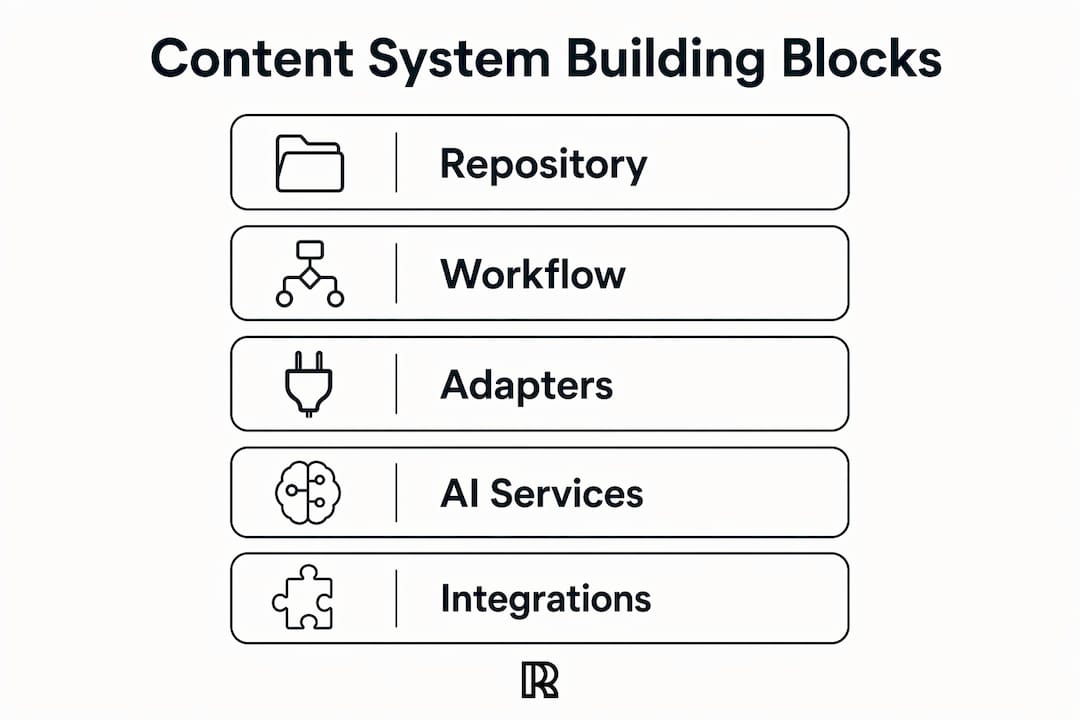
Here is what a working system covers at a glance:
- Content repository: a single source of truth for all drafts, approved posts, and versioned assets
- Orchestration and workflows: approval chains, scheduling pipelines, and repurposing rules
- Delivery adapters: publishing connectors for LinkedIn, email, blog, and other channels
- AI services: voice calibration, multi-agent critique, engagement prediction, and safety guardrails
- Integrations: Notion, Slack, HubSpot, GitHub, and CRM tools that surface ideas and close attribution loops
If you are managing your own LinkedIn presence or running client accounts, the system is what keeps your posting consistent, your voice intact, and your accounts off LinkedIn’s radar.
What does a multi-platform content management system actually include?
Every solid system shares five building blocks, regardless of whether you buy a packaged platform or assemble one from components.
Central content repository. Think of it as the governed library where every piece of content lives with version history attached. No more hunting through Slack threads for the approved draft. Composable content platforms decouple storage from delivery so marketers can push content to new channels without rebuilding infrastructure, which cuts time-to-market considerably.
Orchestration and workflow engine. This is the logic layer: who approves what, in what order, and when it publishes. For agencies managing multiple LinkedIn profiles, a workflow engine is the difference between a controlled operation and a chaotic one.

Delivery adapters. Each channel has its own format requirements. A delivery adapter translates structured content into what LinkedIn, your email platform, or your blog actually expects, without manual reformatting.
AI services. Voice calibration learns your syntax and tone. Multi-agent critique scores drafts before they go live. Engagement prediction recommends timing. Safety guardrails flag policy risks before they become ban risks.
Work tool integrations. Connecting Notion for content briefs, Slack for team alerts, HubSpot for CRM attribution, and GitHub for technical content pipelines means the system pulls ideas from where work actually happens rather than requiring a separate content-planning ritual.
Pro Tip: Wire your HubSpot integration early. Teams that connect CRM data to their content repository can trace which LinkedIn posts drive pipeline, not just likes. That attribution data is what turns a content budget conversation into a straightforward ROI case.
Why does this matter for LinkedIn-focused professionals and agencies?
The honest answer: most LinkedIn content operations fail not from lack of ideas but from lack of system. Posts go out inconsistently, voice drifts across authors, and nobody can tell which content actually drove a conversation or a signup.
A multi-channel content strategy that centralizes a primary channel and repurposes for secondary ones is more sustainable than rebuilding content per platform. For most small teams, focusing on a few key channels beats attempting presence everywhere. LinkedIn as the primary channel, with email or a blog as derivatives, is a pattern that holds up at both individual and agency scale.
The common failure modes are predictable:
- Publishing identical copy across channels with no format adaptation
- No version control, so the “approved” draft is whoever’s copy is most recent
- No attribution, so content effort is invisible to leadership
- Voice drift when multiple authors or AI tools write without a shared model.
Safety is the underappreciated one. LinkedIn’s automated defenses flag accounts that post at inhuman frequencies, use banned phrases, or trigger engagement patterns that look like automation. A governed system with rate limits and approval workflows is not optional for agencies running multiple client accounts.
What AI capabilities actually change your LinkedIn workflow?
The gap between generic AI content tools and a purpose-built system shows up here. Generic tools generate text. A well-tuned system learns your voice, critiques its own output, and publishes within safe parameters.
Voice mapping trains on your existing posts and writing samples to capture syntax, vocabulary, and tone without leaking proprietary phrasing to shared model weights. The output sounds like you, not like a template.
Multi-agent critique runs a draft through specialized scoring agents before it publishes. One agent checks tone consistency. Another flags policy risk. A third scores predicted engagement. AI critique and multi-agent scoring improve draft quality before publish, reducing the chance of policy violations and improving engagement when properly tuned to a user’s voice.
Automated repurposing converts a pillar post or article into LinkedIn carousels, short-form posts, and outreach sequences. Turning pillar content into LinkedIn posts is where the time savings compound fastest for agencies.
Engagement prediction recommends post timing based on your audience’s historical activity, not generic best-practice charts.
“AI-powered automations reduce manual publishing work and enable scale, but require guardrails to preserve voice and avoid low-performing generic posts.” - HubSpot, Multi-channel content distribution
Unified platform or composable architecture: which fits your team?
Two dominant approaches exist, and the right one depends on your team size and integration ambitions.
Unified (single-platform) approach: everything packaged together. Lower integration overhead, faster time-to-value, and tighter managed workflows. The trade-off is vendor dependency and less flexibility when you need a custom pipeline or a channel the platform does not natively support.
Composable (headless) approach: content storage decoupled from delivery, connected via APIs. Contentful and other platform vendors emphasize composable architecture as the scalable approach for multichannel publishing because it separates content modeling from presentation. CoreMedia’s hybrid headless model adds visual editing tools on top of API-first delivery, so marketers are not locked out of the system while developers build custom frontends.
When to pick unified:
- Team of two to five people who need to publish within weeks, not months
- Agency that wants packaged LinkedIn workflows without custom engineering
- Budget that cannot absorb integration development costs.
When to pick composable:
- Brands needing deep CRM, DAM, or commerce integrations
- Agencies managing many delivery formats across many clients
- Teams planning to add channels over the next 12 months
Pro Tip: Tata Communications recommends deep partner relationships to avoid vendor sprawl. Before you commit to a composable stack, count the integrations you actually need today versus the ones you are planning for someday. Most teams overestimate future complexity and underestimate present implementation cost.
How to implement multi-platform content management step by step
- Audit your current state. List every channel, tool, and author. Map where content is created, approved, and published today. Identify gaps in version control and attribution.
- Define your primary channel and two derivatives. LinkedIn as the pillar, with email and a blog or newsletter as repurposing targets, is a proven starting point.
- Model your content schema. Decide what fields every piece of content needs: headline, body, format variant, target channel, approval status, publish date, and attribution tag.
- Wire integrations. Connect Notion or Slack for idea capture, HubSpot for CRM attribution, and your content team’s workflow tools for approval routing.
- Implement AI voice calibration and multi-agent critique. Train on existing approved content. Set critique thresholds before the first pilot post goes live.
- Run a 6 - 8 week pilot. Publish three to five posts per week, track the metrics below, and hold weekly checkpoints to adjust voice models and governance rules.
- Scale. Add client accounts, additional channels, or agency seats once the pilot metrics are stable.
Cost signals: a small pilot typically runs on a low-to-mid SaaS subscription with minimal implementation overhead. Agency rollouts add platform seats and, for composable stacks, integration engineering time.
Governance, safety, and avoiding LinkedIn bans
LinkedIn’s enforcement is automated and fast. An account that triggers the wrong pattern can be restricted before a human reviews it. Governance is not a compliance checkbox; it is operational insurance.
- Least-privilege publishing: separate credentials for drafting, approving, and publishing. No single author should have one-click publish access across all client accounts.
- Rate-limit awareness: schedule posts with human-plausible gaps. Avoid burst-publishing patterns that look like bot behavior.
- Automated safety checks: multi-agent review, banned-phrase filters, and a human-in-loop approval step for high-stakes posts. Resonate’s safe publishing controls enforce configurable rate limits and guardrails at the account level.
- Audit logs and rollback: every published post should have a log entry. If a post gets flagged, you need to know who approved it and what version went live.
- Voice playbook: a written document with channel-specific examples, tone guidelines, and an incident response checklist. Train every author and every AI model against it.
Pro Tip: Never automate the final publish step without a human approval gate for new client accounts. The first 30 days on any account are the highest-risk window for triggering LinkedIn’s defenses.
What to measure: metrics and ROI for multi-platform content management
| Metric | Why it matters | Measurement approach |
|---|---|---|
| LinkedIn engagement rate | Signals content relevance and voice fit | Likes + comments + shares ÷ impressions |
| Profile visits per post | Tracks top-of-funnel interest | LinkedIn analytics, post-level view |
| Content throughput | Measures operational efficiency | Posts published per week vs. team hours |
| Approval cycle time | Identifies workflow bottlenecks | Time from draft submission to publish |
| Content-attributed signups | Proves pipeline contribution | UTM tracking + CRM attribution |
| Time saved per post | Converts efficiency to dollar ROI | Baseline hours minus post-system hours |
Automation plus unified data enables multi-touch attribution and reduces manual distribution bottlenecks, which is the core of any ROI case for this kind of investment.
For agencies, the ROI conversation is simpler: track billable hours saved per client account per month, then multiply by your rate. A system that saves four hours per client per month across ten clients is forty hours of recovered capacity.
How Resonate maps to multi-platform needs for LinkedIn
Resonate is built specifically for the LinkedIn use case described throughout this guide. Here is how its features map to the components above:
- Voice calibration: trains on your existing posts to generate content that sounds like you, not a generic AI
- Multi-agent AI critique: pre-publish scoring for tone, policy risk, and predicted engagement
- Integrations: Notion, Slack, HubSpot, GitHub, and Salesforce connections that surface post ideas from real work
- Safe publishing automation: configurable rate limits, guardrails, and ban-avoidance heuristics built into the scheduler
- Agency features: per-client voice models, white-label reporting, and ban-safe multi-account support
- Community boosts: amplify reach immediately after publication through coordinated engagement
For agencies managing multiple client LinkedIn profiles, Resonate’s per-client governance model means each account has its own voice model and approval workflow, so a post for a fintech founder never sounds like a post for a marketing consultant.
The platform’s AI critique feature reduces policy violations and improves engagement when properly tuned to a user’s voice, making it a practical fit for the governance requirements described in this guide. - Resonate AI critique
How to decide and what to do next
Before you commit to any platform or architecture, run through this checklist:
Decision checklist:
- Which channels are non-negotiable? (LinkedIn should be first.)
- What integrations do you need on day one vs. month six?
- How many authors or client accounts will the system need to govern?
- What is your risk tolerance for LinkedIn account restrictions?
- Do you have engineering capacity for a composable stack, or do you need packaged workflows?
Pilot checklist:
- Scope: 6 - 8 weeks, one primary author or client account, LinkedIn as the sole publish target
- Measurement plan: engagement rate, profile visits, time saved per post, and one attribution metric
- Governance rules: approval workflow, rate limits, and voice playbook in place before week one
- Success criteria: defined before you start, not after
“The sustainable approach sits between copy-paste and rebuilding per channel - centralize a primary asset and repurpose deliberately.” - Averi, Multi-Channel Content Strategy
If you need production support while building your content pipeline, creative content production services can fill the gap during the pilot phase.
Key Takeaways
Multi-platform content management works when you centralize voice control, govern publishing access, and measure attribution from day one.
| Point | Details |
|---|---|
| Definition | A central system that stores, governs, adapts, and automates content across channels while preserving voice and safety. |
| Architecture choice | Small teams and agencies needing fast time-to-value should pick unified; composable fits teams with deep integration needs. |
| Governance first | Separate draft, approval, and publish credentials before automating any LinkedIn account. |
| Measure what matters | Track engagement rate, approval cycle time, and content-attributed signups to build a credible ROI case. |
| Resonate | Combines AI voice calibration, multi-agent critique, safe publishing automation, and agency-grade per-client governance for LinkedIn. |
The part most guides skip
The architecture debate, unified versus composable, gets most of the attention in this space. What gets far less is the voice problem. You can build a technically perfect content system and still produce posts that sound like they came from a committee. That is the failure mode I see most often in agency implementations: the governance is solid, the integrations work, but the output is bland because nobody invested in the voice model.
The fix is not more prompting. It is training the AI on content the client actually wrote, running critique agents that flag tone drift specifically, and keeping a human in the approval loop long enough to catch the drift before it becomes the new normal. Scale the system only after the voice is locked in. Rushing to ten client accounts before the voice model is stable means ten accounts that all sound vaguely similar, which defeats the entire purpose of personalized LinkedIn content.
The other lesson: start with fewer channels than you think you need. Two channels done well outperform five channels done poorly every time.
Resonate is built for exactly this workflow
Most LinkedIn automation tools treat every user the same. Resonate trains on your actual writing, runs multi-agent critique before anything publishes, and enforces rate limits that keep your account safe. For agencies, it adds per-client voice models, white-label reporting, and multi-account governance that scales without adding headcount.
The 14-day free trial gives you enough time to run a real pilot: connect your integrations, calibrate your voice model, and publish your first governed batch of posts. If it does not fit, the 30-day money-back guarantee covers you. Start your LinkedIn content pilot today and see what a purpose-built system produces compared to what you are doing now.
Useful sources and further reading
- Contentful: Multichannel publishing without the chaos - composable architecture and channel-specific optimization
- HubSpot: Multi-channel content distribution - automation, attribution, and measurement frameworks
- Averi: Multi-Channel Content Strategy Guide - pillar content, repurposing stacks, and sustainable channel focus
- Tata Communications: Multi-platform management benefits - single-partner strategy and vendor sprawl avoidance
- CoreMedia: Hybrid Headless CMS - composable architecture with visual editing for marketers
- Mailchimp: Omnichannel content strategy - omnichannel vs. multichannel distinctions and governance
- Resonate: AI critique feature - multi-agent pre-publish scoring and policy risk reduction
- Resonate: Safe LinkedIn outreach - ban-avoidance mechanics and rate-limit controls
- Resonate: Agency features - per-client voice models and multi-account governance
Recommended

Content Writer @ Resonate
Charlotte explores LinkedIn content, personal branding, AI writing, and founder-led marketing at Resonate. She believes the best content comes from real experience, not generic advice, and writes practical insights to help founders turn what they already know into content that people want to read.
Write LinkedIn content that sounds like you
with Resonate's AI Voice Engine