LinkedIn Content Strategy to Grow Your Side Business
LinkedIn Content Strategy to Grow Your Side Business
 . If you want to try this yourself, spin up a draft with Resonate's LinkedIn content generator.
Core strategies for LinkedIn content side business growth
Your LinkedIn content is already part of your sales process. Most side business owners treat it as marketing. That framing costs them clients.
The founders who consistently convert LinkedIn into revenue share a few habits. They write posts from real client conversations, not from what they think sounds credible. They post 2 - 3 times weekly on a rhythm they can sustain for a year, not a sprint they abandon by month two. And they treat every comment and DM as the actual work, not the post itself.
Here is what that looks like in practice:
- Write from specificity. A post describing a client’s exact problem outperforms any post about “the founder journey.” People recognize their own situation and respond.
- Post 2 - 3 times per week. Three posts weekly is the optimal cadence for sustained engagement and credibility. Posting daily or more often leads to burnout and reduced effectiveness.
- Protect the first 60 - 90 minutes. Substantive comments, shares, and saves in the first hour after posting carry more algorithmic weight than passive likes. Stay active in that window.
- Use document posts and short videos. PDF carousels and one-take phone videos generate the longest dwell times of any format, which is what LinkedIn’s algorithm rewards now.
- Follow up in DMs. The post opens the conversation. Revenue comes from what happens after someone comments.
- Use AI as a drafting tool, not a ghostwriter. Tools like Resonate help you produce content faster without flattening your voice into something your audience will immediately recognize as generic.
The underlying principle: LinkedIn content for side business growth works when you treat each post as the opening line of a sales conversation, not the finish line.
How to build a LinkedIn content strategy that actually fits your side business
A LinkedIn content strategy for a side business has one constraint a corporate content team does not: you. Your time is limited, your energy is finite, and if the system requires more than a few hours a week, it will collapse by month two.
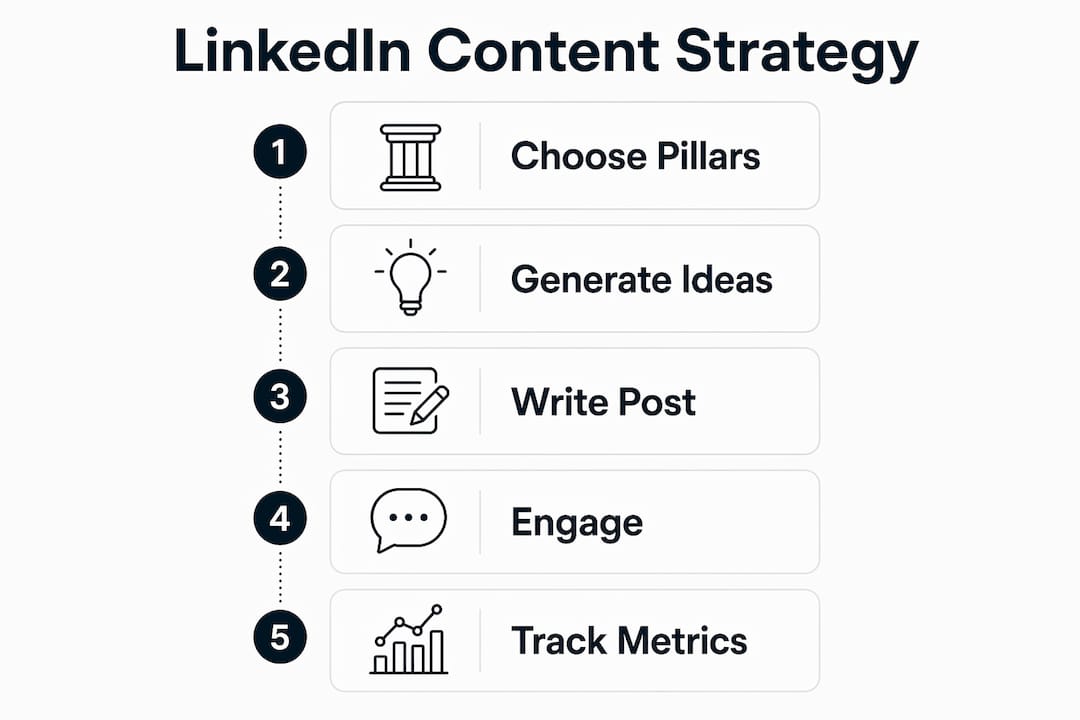
Step 1: Choose 2 - 3 content pillars
Pick two or three niche themes that sit at the intersection of your expertise and your audience’s problems. A freelance UX designer might post around client communication, pricing strategy, and portfolio mistakes. Every post lives in one of those lanes. Posting repetitive content types drops reach and bores your audience, so rotate deliberately across your pillars each week.

Step 2: Build a simple content calendar
A weekly rhythm that works for most side business owners looks like this:
- Monday: One text post drawn from a client conversation, sales call, or piece of feedback from the previous week.
- Wednesday: One opinion post, a clear stance on something in your industry, written in under 150 words.
- Friday: One document or short video breaking down a process, a mistake, or a result aimed at people further along in their buying decision.
- Daily (10 - 15 minutes): Comment on five posts from people in your actual target audience.
Step 3: Generate ideas from client interactions
Review your client conversations every week. What objections came up? What question did someone ask that you had to think about? What mistake did a prospect make before they found you? Each of those is a post. You will never run out of material if you treat client interactions as a content source.
Step 4: Write in your own voice, then edit with AI
Draft posts the way you would explain something to a client on a call. Then use an AI tool to tighten the structure, sharpen the hook, or suggest a stronger opening. The key is that the specific details, your rhythm, your opinion, stay yours. Audiences detect flat, over-polished AI tone and disengage from it.
Step 5: Engage before and after you publish
Commenting on 3 - 5 relevant posts in the first 30 minutes after you publish boosts your own post’s reach. The algorithm reads it as a relationship signal. Spend 15 minutes engaging before you hit publish, then stay active in your own comments for the first hour.

Step 6: Track what actually matters
Impressions tell you reach. Engagement rate tells you resonance. Profile visits tell you whether the post made someone curious enough to check you out. DM volume tells you whether the content is opening conversations. Track all four, but weight the last one most heavily. A post with modest reactions that generates three DMs is outperforming a post with hundreds of likes and zero follow-up conversations.
Pro Tip: Set a weekly 20-minute review. Pull your top post from the previous week, note what made it work (format, topic, opening line), and replicate that element in the following week’s content. Small iterations compound fast.
Proven tactics to turn LinkedIn connections into real business conversations
Engagement numbers are not the goal. They are the signal that tells you who to talk to next.
Posts with under 30 reactions can bring in high-value clients through effective comment and DM follow-up. The post is the opening line of a conversation, not the whole sale.
Most side business owners publish a post, watch the likes roll in, and move on. The ones generating consistent revenue from LinkedIn are doing something different in the hours after a post goes live. Here is the full sequence:
- Monitor who comments, not just who likes. A commenter took time to write something. That is intent. Prioritize them over passive likers in every follow-up decision.
- Respond to comments within 24 - 48 hours. A real reply, not a thumbs-up, keeps the conversation alive and signals to the algorithm that your post is generating genuine engagement.
- Move the best conversations to DMs. After two or three comment exchanges, send a direct message referencing the conversation. Not a pitch. A natural continuation: “Loved your take on X, curious whether you’ve run into Y as well.”
- Build a prospect list from your best posts. When a post resonates in your niche, the people engaging with it are self-selecting as interested parties. Note their names, check their profiles, and add them to a focused outreach list.
- Send personalized connection requests. Reference the specific post or comment in your note. Connection requests that mention a real prior interaction convert at a much higher rate than generic ones.
- Track profile viewers after a post goes live. Someone who views your profile after seeing your content took an extra step. That is intent worth acting on the same day.
- Prioritize quality of audience over size. A smaller, highly targeted network consistently outperforms a massive, unfocused one on every engagement metric that ties back to revenue. Only 3% of LinkedIn users post more than once per week, which means consistent, niche-specific content gives you a visibility advantage most of your competitors are not even trying to claim.
The metric that ties everything back to revenue is outreach response rate from engaged prospects versus cold contacts. Track that gap. It will tell you more about whether your content is working than any vanity dashboard.
For a deeper look at how LinkedIn content compares to direct outreach for generating pipeline, the content vs. outreach breakdown on the Resonate blog is worth reading before you decide where to spend your time.
How to optimize your LinkedIn profile and content formats for side hustle success
Your profile is the landing page your content sends people to. If the profile does not match the content, you lose the conversion before it starts.
Profile alignment with posted content topics affects reach and viewer perception more than post frequency alone. If your headline says one thing and your posts say another, the algorithm does not know who to route your content to, and your reach gets capped. Human readers make the same judgment in about two seconds.
Profile elements that do the heavy lifting
- Headline: Write it for the person you want to attract, not for your resume. “Helping B2B consultants close more retainers through LinkedIn content” is a headline. “Senior Marketing Manager at Acme Corp” is a job title. One of those makes the right person click through.
- About section: Use it to describe the specific problem you solve, who you solve it for, and what working with you looks like. Align it with your content pillars so the algorithm and the reader both see consistency.
- Featured section: This is your call-to-action real estate. Link your best-performing post, a lead magnet, a booking page, or a case study. Most side business owners leave this blank.
- Banner image: A professional banner built to LinkedIn’s recommended dimensions does more credibility work than most people give it credit for. Use it to reinforce your niche, not to display a generic gradient.
Pro Tip: Audit your last ten posts and your profile headline in the same sitting. If a stranger could not identify your niche from both in under ten seconds, rewrite the headline before you publish another post.
Content formats ranked by what actually works
Document posts (PDF carousels) consistently generate the longest read time of any format. A five-slide process breakdown, a before-and-after case study, or a checklist in carousel format outperforms static posts in saves and dwell time. Use them for anything with steps.
Text posts built from real client dialogues perform best when they are specific and under 300 words. Opinion posts work best under 150 words with a clear stance. Short videos work when you can film in one take without reading from a script. A shaky 30-second phone video answering one real client question beats a polished 90-second edited clip most of the time.
Polls generate reactions but rarely generate business. Use them once a month at most, never as a primary format.
Rotate formats across your weekly schedule. Posting the same content type repeatedly drops reach and trains your audience to scroll past you. Variety keeps both the algorithm and your readers paying attention.
The role of content marketing in brand growth extends well beyond LinkedIn, but the same principle applies everywhere: consistency of topic combined with variety of format is what compounds into authority over time.
How AI-powered tools can accelerate your LinkedIn content without killing your voice
AI does not replace the thinking. It removes the friction between having an idea and getting it published.
The most common failure mode with AI-assisted LinkedIn content is over-polishing. You feed a rough idea into a tool, get back something grammatically perfect and completely generic, and post it without editing. Audiences are getting sharper at detecting the flat, over-polished tone that comes from skipping the human edit entirely. The posts that land are the ones with your actual sentence rhythm, your actual opinions, your actual specific numbers, even if AI helped you get the first draft down faster.
Here is how to use AI tools well for LinkedIn content:
- Use AI to draft, not to write. Feed it a voice note, a bullet list of ideas from a client call, or a rough paragraph. Let it structure the draft. Then rewrite the opening line and any sentence that does not sound like you.
- Preserve specific details. The client’s exact objection, the actual number from a before-and-after, the precise mistake someone made. AI tends to generalize these. Put them back in.
- Use AI critique to improve, not to approve. A good AI critique agent will flag a weak hook or a buried point. That feedback is useful. Accepting every suggestion without judgment is not.
What Resonate does differently
Resonate is built specifically for this problem. Rather than generating generic LinkedIn posts from a prompt, it trains on your individual voice patterns, pulling in data from tools you already use, including Notion, Slack, HubSpot, and GitHub, to surface post ideas grounded in your actual work.
| Feature | What it does for your side business |
|---|---|
| Voice calibration | Drafts posts that match your sentence rhythm, not a generic AI tone |
| Work tool integrations | Pulls ideas from Notion, Slack, HubSpot, and GitHub automatically |
| Safe automation guardrails | Configurable posting limits prevent LinkedIn account bans |
| Community boosts | Amplifies post reach in the first minutes after publication |
| AI critique agents | Flags weak hooks and buried points before you publish |
| Engagement analytics | Tracks what works over time and refines recommendations |
| MCP API access | Supports advanced workflows for power users |
The safety layer matters more than most people realize. Generic automation tools that post at high volume or mimic engagement patterns get accounts flagged. Resonate’s guardrails are configurable, designed specifically to keep your account safe while maintaining consistent output. For a full look at what those protections involve, the LinkedIn engagement automation risks breakdown covers what most tools do not tell you.
The practical workflow looks like this: connect your work tools, let Resonate surface ideas from your recent activity, review and edit the draft in your voice, schedule it with safe timing limits, then monitor the analytics to see which topics and formats your audience responds to. The community boost feature fires immediately after publication, amplifying reach in the critical first window when the algorithm is deciding how widely to distribute your post.
For side business owners who want to integrate LinkedIn content with their CRM, the CRM and LinkedIn integration guide on the Resonate blog walks through how to connect content performance data to your actual pipeline.
Resonate turns your LinkedIn content into a consistent side business engine
Most LinkedIn content tools give you a generic post and call it done. Resonate gives you a post that sounds like you wrote it on your best day, scheduled safely, with the analytics to tell you what to write next.
For side business owners, the bottleneck is almost never ideas. It is the time and consistency to turn ideas into published content week after week without burning out or losing your voice. Resonate connects to the tools you already use, learns your writing style from real examples, and handles the scheduling and safety guardrails so you are not manually managing posting limits or worrying about account flags. The community boost feature amplifies your reach in the first minutes after publication, exactly when the algorithm is deciding how far to distribute your post. You get AI-powered LinkedIn features built for professionals who need their content to sound personal, not automated. Start your first voice-calibrated post at Resonate.ai and see the difference a tool trained on your actual voice makes.
Key Takeaways
LinkedIn content drives side business growth when posts come from real client conversations, follow a sustainable cadence, and are treated as conversation starters rather than finished marketing assets.
| Point | Details |
|---|---|
| Post 2 - 3 times per week | Three posts weekly is optimal for sustained engagement and long-term credibility, while higher frequencies increase the risk of burnout and reduce results. |
| Protect the first 60 - 90 minutes | Substantive comments and saves in this window carry more algorithmic weight than passive likes. |
| Profile and content must align | Mismatched profiles and post topics suppress reach; the algorithm rewards consistency across both. |
| DMs convert, reactions don’t | Posts with under 30 reactions can bring in high-value clients through effective comment and DM follow-up. |
| Resonate | Trains on your voice patterns and integrates with Notion, Slack, and HubSpot to generate authentic, safely scheduled LinkedIn content. |
Recommended

Content Writer @ Resonate
Charlotte explores LinkedIn content, personal branding, AI writing, and founder-led marketing at Resonate. She believes the best content comes from real experience, not generic advice, and writes practical insights to help founders turn what they already know into content that people want to read.
Write LinkedIn content that sounds like you
with Resonate's AI Voice Engine