How Content Scheduling Automation Works: A Practical Guide
How Content Scheduling Automation Works: A Practical Guide

Content scheduling automation is the system that takes approved content and turns it into timed, platform-formatted posts across channels without manual intervention. A new blog post publishes to your CMS, a Zapier trigger fires, the post gets reformatted into three platform-specific variants, and all three land in a publish queue with zero human clicks after approval. That is the core loop.
Here is what a simple trigger-action pair looks like in practice:
- Trigger: New post published in CMS (WordPress, Ghost, or Notion)
- Transform: Reformat into a LinkedIn post (under 3,000 characters), an X thread, and a short-form Instagram caption
- Schedule: Queue each variant for the optimal time slot per platform
- Publish: Push via platform APIs; log result and collect engagement data
The business outcome is consistent publishing at scale. Teams that run this pipeline stop losing posts to calendar gaps, time-zone confusion, or the simple fact that nobody remembered to hit “post” at 9 AM on Tuesday.
How content scheduling automation differs from manual posting
Manual posting means someone opens a platform, writes or pastes content, picks a time, and clicks publish. Done once, it is fine. Done across four channels, three time zones, and a 30-post-per-month calendar, it becomes a full-time job.
Scheduling automation handles the repeatable parts: planning the calendar, formatting content per platform, timing posts for peak engagement windows, pushing to publish APIs, and pulling back basic analytics. What it does not replace is editorial judgment. Strategy, creative direction, and crisis response still need a human. The automation handles execution; people handle decisions.
Pro Tip: Start with scheduling and publishing before you add AI content generation. Getting the pipeline reliable first means you catch formatting errors and rate-limit issues before they compound with AI-generated volume.
The benefits of content scheduling go beyond convenience. Scheduled content reduces ad-hoc context switching, supports a cohesive multi-channel strategy, and frees the team to focus on creative work rather than logistics.
The technical building blocks of a scheduling pipeline
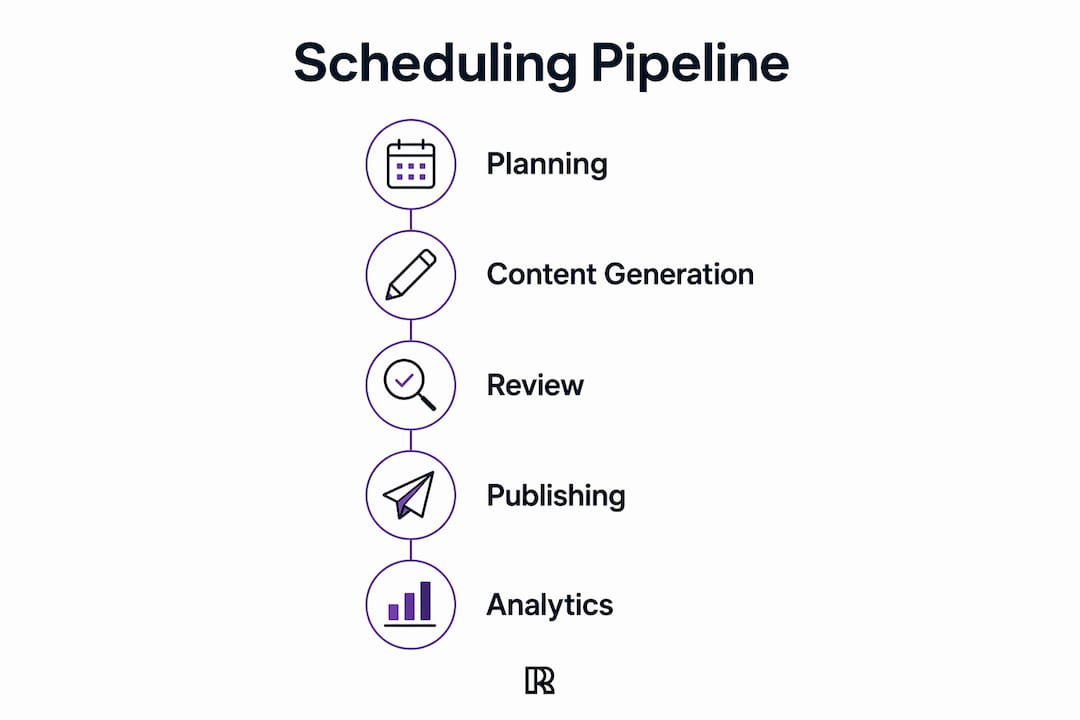
A five-stage pipeline covers the full flow: planning, generation, review, publishing, and analytics. Each stage removes a specific source of friction. Here is how the components map to responsibilities:
| Component | Responsibility | Example Technologies |
|---|---|---|
| Trigger | Detects the event that starts the workflow | CMS webhook, calendar event, file upload, cron job |
| Content source | Stores the raw content or brief | CMS, Notion, Airtable, Google Docs |
| Connector / middleware | Moves data between systems | Integration middleware (e.g., Zapier), custom API calls |
| Transform / template engine | Reformats content per platform rules | Character-limit trimmer, hashtag injector, image resizer |
| Approval queue | Holds posts for human or AI review before publish | Slack approval bot, native workflow tool, monday.com board |
| Scheduler / dispatcher | Times and sequences the publish calls | Built-in scheduler, cron, platform native scheduler |
| Publish API | Delivers the post to the platform | LinkedIn API, Meta Graph API, X API v2 |
| Logging / monitoring | Records outcomes and alerts on failures | Analytics dashboard, error log, alerting service |
Four trigger-action pairs that illustrate how these pieces connect:
- Event-driven (CMS): New post published in CMS → middleware detects webhook → transform into LinkedIn and X variants → add to approval queue → schedule for next optimal slot
- Event-driven (calendar): Event added to Google Calendar → middleware fires → pull event copy from Notion → format as announcement → publish 48 hours before event start
- Time-driven (evergreen): Every Monday at 8 AM → pull next post from evergreen queue → verify no duplicate in last 30 days → publish to LinkedIn
- File-driven (asset upload): New image uploaded to shared drive → trigger product-update post template → attach image → route to approval → schedule for Thursday
Zapier’s content-scheduling automations show these trigger types in production: new CMS posts, calendar events, and file uploads that automatically queue or publish social updates. The middleware layer is where most teams start because it requires no custom code.
Real-world use cases and mini-workflows
Knowing the components is one thing. Seeing them in a workflow you actually recognize is what makes the architecture click.

Blog-post syndication is the most common starting point. A new article publishes to WordPress or Ghost, a webhook fires, middleware pulls the title, excerpt, and URL, and a template generates a LinkedIn post and an X thread. Both go into an approval queue. A human reviews in under two minutes, approves, and both posts go live at the scheduled time. For a solo creator, this cuts syndication from 20 minutes of manual work to a two-minute review. If you want to try this yourself, spin up a draft with Resonate's LinkedIn content generator.
Event-driven campaign push works for product launches and webinars. When a calendar event is created with a specific tag, the pipeline generates a sequence: an announcement post 7 days out, a reminder 48 hours before, and a recap post 24 hours after. Each goes through the same approval queue. The team writes the copy once; the scheduler handles the rest.
Recurring evergreen streams are where solo creators and small teams get the most leverage. A set of evergreen tips gets loaded into a topic stream with a configurable recycle gap. Topic streams and evergreen recycling let creators publish a set of posts on a recurring schedule with roughly one hour of weekly maintenance. The posts rotate automatically, and the gap setting prevents the same post from appearing twice within a defined window.
First-comment scheduling is a less obvious but high-value pattern, especially on LinkedIn. The main post publishes via API, and a second trigger fires 60 seconds later to post a first comment with a link or CTA. This keeps the main post clean while still driving traffic.
Scale considerations matter here. A solo creator can run a simple Zapier workflow with a one-person approval step. An agency managing 15 client accounts needs role-based permissions, per-client approval queues, and audit logs. Enterprise teams add CRM triggers (a deal closes → publish a case study) and require compliance review before anything goes live.
What teams actually gain from scheduling automation
The business case comes down to four things: time, consistency, reach, and compounding data.
- Time saved: Removing manual posting and reformatting from the daily workflow returns hours per week, especially for teams managing multiple channels or accounts.
- Cadence reliability: Scheduled posts go out on time regardless of who is sick, traveling, or in back-to-back meetings. Consistent cadence is one of the strongest predictors of audience growth on LinkedIn and similar platforms.
- Multi-channel reach: A single piece of content, reformatted and timed per platform, reaches audiences who would never see a single-channel post.
- Evergreen content reuse: Top-performing posts get recycled on a gap schedule, extending their value without additional creative work.
- Centralized analytics: When publish events and engagement data flow into one place, the team can see what works across channels without pulling reports from five different dashboards.
Statistic callout: Scheduled content supports higher quality output and consistent cadence across channels, and practitioners tie quarterly reporting directly to the content calendar, making ROI measurement systematic rather than ad hoc.
For a small team, the practical ROI includes recovering time weekly from manual posting and reformatting tasks. For an agency running 10 or more client accounts, the math shifts to content throughput: the same team can manage significantly more accounts without adding headcount, because the pipeline handles execution.
Must-have features when evaluating scheduling tools
Not every tool is worth the setup cost. These are the features that separate a real scheduling platform from a basic queue manager:
- Multi-channel composer: Write once, format per platform. Without this, you are still doing manual reformatting.
- Platform formatting presets: Character limits, hashtag templates, image-size rules baked in so posts do not fail on publish.
- Approval workflows: Every post should require a human or AI review step before it goes live. No exceptions for automated pipelines.
- Evergreen / recycle settings: Configurable gap controls so top content republishes without duplicating within a short window.
- Rate-limit handling: The tool must respect platform API rate limits automatically. A pipeline that ignores rate limits will get accounts flagged or banned.
- Analytics and reporting: Engagement, reach, CTR, and error rates in one view, ideally with scheduled exports.
- Role-based permissions: Especially for agencies. Writers, editors, and approvers need different access levels.
- Audit logs: A record of every post, every approval, and every publish event. Non-negotiable for compliance and debugging.
- AI critique / safety scoring: Automated review of tone, brand voice, and risk before the post reaches the human approval queue.
Zapier and similar middleware platforms handle the connector layer between your CMS, calendar, Slack, Notion, Airtable, and the scheduling tool itself. monday.com works well as an approval and project-tracking layer, giving teams a visual board where content moves from draft to approved to scheduled. For CRM-to-content triggers, a HubSpot integration lets deal stages or contact events fire content workflows automatically.
For small teams, prioritize the composer, approval workflow, and analytics first. Add evergreen recycling and CRM triggers once the core pipeline is stable. Agencies should add role-based permissions and audit logs from day one. Generative AI in marketing workflows, as outlined in practical AI marketing playbooks, increasingly includes scheduling automation as a core layer rather than an add-on.

How to implement scheduling automation step by step
A phased rollout beats a big-bang launch every time. Here is the sequence that works:
- Define content pillars and cadence. Decide what topics you will cover, how many posts per week per channel, and which channels are in scope. Write this down before touching any tool.
- Map your content sources. Where does content live today? CMS, Notion, Airtable, Google Docs? Each source needs a connector or webhook.
- Choose your middleware and scheduling tool. For most teams, a middleware layer (Zapier or equivalent) plus a dedicated scheduling platform covers the full stack. Pick tools that have native integrations with your content sources and target platforms.
- Build transforms and templates. Create platform-specific templates: LinkedIn post format, X thread format, Instagram caption format. Include character-limit rules, hashtag slots, and image-size specs.
- Create the approval queue. Set up a review step that every post must pass before scheduling. Route approvals to Slack, email, or a project board. Define who approves what.
- Run a pilot test. Start with evergreen content on one channel. Publish 10 posts through the full pipeline and verify formatting, timing, and analytics collection at each step.
- Define success criteria and expand. If error rate is below 5% and formatting passes on all 10 posts, expand to additional channels. Add AI drafting only after the pipeline is stable.
- Schedule a weekly maintenance window. Review the queue, check analytics, and rotate evergreen content. About one hour per week is the standard for solo creators; agencies may need more.
Timeline and cost ranges: A pilot for a small team typically takes two to four weeks to set up and stabilize. Middleware costs vary from free tiers to professional plans costing tens of dollars monthly. Dedicated scheduling platforms add further monthly costs depending on account features. Agency setups with multi-client management and white-label reporting are generally higher priced. Full-stack automation including AI drafting and CRM triggers can take six to twelve weeks to roll out properly.
Testing checklist before going live:
- Verify each trigger fires correctly in a staging environment
- Confirm platform formatting passes native preview on each channel
- Test the approval queue with a real reviewer in the loop
- Check that rate-limit handling is active and configured per platform
- Confirm analytics events are logging correctly post-publish
Common risks and how to guard against them
Automation publishes at scale. That means mistakes also happen at scale if you skip the guardrails.
The most common failure mode is tone mismatch. A post drafted for a product launch goes out the day a public crisis breaks. Pre-scheduled posts can be deeply insensitive during crises without guardrails, as scheduling practitioners note. The fix is a pause control: every pipeline needs a single switch that halts all scheduled posts immediately, and someone needs to own the responsibility of hitting it when the news cycle demands it.
Misformatted media is the second most common issue. Images sized for Instagram fail on LinkedIn. Videos that exceed platform duration limits get rejected silently, and the post goes live with no visual. Platform formatting presets and a pre-publish preview step catch this before it reaches the API.
Broken links in scheduled posts are easy to miss because the post looks fine in the composer. A link-validation step in the transform stage, or a pre-publish check, prevents dead links from going live.
Rate-limit violations are a real account-ban risk. Every platform API has daily and hourly publish limits. A pipeline that does not respect those limits will trigger platform safety systems. Configure rate-limit handling at the middleware or scheduler level, not as an afterthought.
Unmonitored automation can cause formatting errors, broken links, or tone-deaf posts that damage brand reputation. The guardrails that prevent this are: an approval workflow that every post passes through, an automated critique step that scores tone and brand alignment before human review, pre-publish platform previews, escalation alerts for publish failures, and a documented pause protocol.
Pro Tip: Set an alert for any publish failure within 15 minutes of the scheduled time. A failed post that sits unnoticed for hours means a gap in your calendar and a missed engagement window. Most scheduling platforms support webhook-based failure alerts.
The human-in-the-loop requirement does not disappear as the pipeline matures. It shifts. Early on, humans review every post. Later, AI critique handles the first pass and humans review only flagged items. But for brand-sensitive content, executive communications, or anything touching a live news event, human review stays mandatory.
Which metrics to track and how to improve over time
The pipeline is only as good as the feedback loop that improves it. Track these KPIs from day one:
- Engagement rate: Likes, comments, and shares divided by impressions. The primary signal of content resonance per platform.
- Reach and impressions: How many unique accounts saw the post. Useful for cadence experiments (does posting at 8 AM vs. 12 PM change reach?).
- Click-through rate (CTR): Relevant for posts with links. Low CTR on a high-reach post means the copy is not compelling enough to drive action.
- Saves and reposts: On LinkedIn and Instagram, saves signal that content has lasting value. High saves on evergreen posts confirm they are worth recycling.
- Conversion events: If posts link to landing pages, track downstream conversions. This connects the content calendar to revenue.
- Publishing success rate: The percentage of scheduled posts that publish without error. Anything below 98% warrants a pipeline audit.
- Error rate by trigger type: Break down failures by trigger (CMS webhook vs. calendar vs. cron) to find the weakest link in the pipeline.
Quick experiments worth running in the first 90 days:
- Cadence A/B test: Run 3 posts per week for one month, then 5 per week the next. Compare engagement rate and follower growth.
- Format test: Same content, different structure (short paragraph vs. bullet list vs. carousel). Which format drives more saves?
- First-comment timing: Test 30 seconds vs. 5 minutes after publish for first-comment drops. Earlier tends to perform better on LinkedIn.
- Evergreen recycle gap: Test a 60-day gap vs. a 90-day gap. Shorter gaps increase volume; longer gaps reduce audience fatigue.
Automated analytics collection and weekly AI summaries close the feedback loop so scheduling decisions improve without manual aggregation. Set up a scheduled pull from each platform’s analytics API into a central performance tab, and configure a weekly summary that surfaces the top three and bottom three posts. That 10-minute weekly review replaces hours of manual reporting.
How Resonate implements safe LinkedIn scheduling
Resonate maps directly to the architecture described above, built specifically for LinkedIn. The integration layer connects Notion, Slack, GitHub, and HubSpot to the content pipeline. Notion serves as the content source and brief repository. Slack handles approval notifications and escalation alerts. HubSpot feeds deal-stage and contact events as triggers for content workflows. GitHub connects for technical teams that want to trigger posts from release events.
The safe publish flow works like this: a content draft is generated or imported, then routed through multi-agent AI critique that scores the draft for tone, brand alignment, and risk before any human sees it. Flagged drafts get returned for revision; clean drafts move to the human approval queue. Once approved, the scheduler dispatches the post via LinkedIn’s API with configurable rate-limit controls. Immediately after publish, a community boost fires to amplify reach in the first engagement window. Analytics flow back into the platform and improve future predictions.
The LinkedIn scheduling workflow includes pause controls, audit logs, and per-account safety limits so teams can automate without risking account flags. For agencies, per-client management and white-label reporting mean the same pipeline scales across multiple LinkedIn profiles without mixing client data.
Pro Tip: Voice calibration is what separates a safe automated post from one that reads like a bot wrote it. Resonate trains on your actual writing patterns before generating or critiquing drafts, which means the AI critique step catches off-brand phrasing that a generic tool would miss. Set up voice calibration before you run your first automated post.
For solo professionals on LinkedIn, the same pipeline runs lighter: Notion as the content source, AI critique as the first-pass reviewer, and a one-person approval step before scheduling. The community boost still fires post-publish, and analytics feed back into post-idea surfacing over time.
Key Takeaways
Content scheduling automation works reliably only when triggers, transforms, approval queues, and monitoring are all in place before volume scales.
| Point | Details |
|---|---|
| Start with scheduling, not generation | Automate publishing of manually created content first; add AI drafting only after the pipeline is stable. |
| Approval queues are non-negotiable | Every automated post needs a human or AI review step before it reaches the publish API. |
| Instrument analytics from day one | Track engagement rate, CTR, and publish success rate so experiments improve the schedule over time. |
| Rate-limit handling prevents bans | Configure platform API rate limits at the middleware or scheduler level before going live on any account. |
| Resonate for LinkedIn | Resonate combines voice-calibrated drafts, multi-agent AI critique, safe publish controls, and community boosts in one LinkedIn-specific pipeline. |
The part most guides skip
The conventional wisdom on content scheduling automation is “set it and forget it.” That framing is wrong, and it is the reason most teams hit a wall around month two.
A phased rollout is the only approach that actually holds. Schedule first. Get the pipeline reliable, catch the formatting errors, and build trust with the approval layer. Then add AI drafting. Then extend to trigger-based syndication once the team has seen enough cycles to know what the pipeline does under pressure. Skipping phases does not save time; it just moves the debugging to a worse moment.
Human-in-the-loop is not a temporary training wheel. Brand voice is not a checklist item a model can fully replicate, and crisis contexts change what is appropriate to publish in ways no scheduler can anticipate. The approval queue is where judgment lives. Shrink it too fast and you will publish something you regret.
Where automation tends to fail in months 1 - 3 is not the technology. It is the absence of a pause protocol, the absence of someone who owns the monitoring alerts, and the assumption that once the pipeline runs, it runs forever without maintenance. Platforms change their APIs. Rate limits tighten. A post format that worked in January stops rendering correctly in March. The AI marketing strategies that hold up are the ones built with maintenance windows baked in from the start. Schedule the weekly review the same day you launch the pipeline.
Resonate makes safe LinkedIn automation practical
Most scheduling tools give you a queue and a calendar. Resonate gives you a full LinkedIn content pipeline: voice-calibrated drafts that sound like you wrote them, multi-agent AI critique that scores every post before it reaches your approval queue, and safe publish controls that respect LinkedIn’s rate limits so your account stays clean.
The integrations are already built. Connect Notion, Slack, or HubSpot and your content sources flow directly into the pipeline. The community boost fires automatically after each post to maximize early engagement. Analytics improve post-idea surfacing over time, so the system gets sharper the longer you use it.
- Safe publishing: Configurable rate limits and pause controls protect your LinkedIn account
- AI critique: Every draft scored for tone and brand alignment before you approve it
- Analytics that learn: Engagement data feeds back into the platform to surface better ideas
If you want a pipeline that already has the guardrails built in, see how Resonate compares and start a 14-day free trial.
Useful sources and further reading
The sources below are worth bookmarking if you are building or evaluating a scheduling pipeline:
- Zapier Content Scheduling Automations: The canonical reference for CMS-to-social trigger patterns and middleware setup. Start here when mapping your connector layer.
- CodeWords: Automate Social Media Posting Schedule: Detailed runbooks for each pipeline stage, including analytics automation and weekly summary setup. Prioritize the analytics and review sections.
- BrandGhost: How to Automate Social Media Posting: Practical guide for solo creators covering evergreen topic streams, recycle gaps, and weekly maintenance routines.
- Lone Fir Creative: 7 Benefits of Content Scheduling: Business-case framing for scheduling automation, including quarterly reporting tied to the content calendar.
- Social Progress: The Benefits of Content Scheduling: Covers time-zone and cadence tradeoffs and the brand-risk considerations of pre-scheduled posts.
- Resonate AI Critique Feature: Product documentation on multi-agent critique scoring for LinkedIn drafts before publish.
- Resonate LinkedIn Scheduler: Full walkthrough of Resonate’s scheduling features, safe publish controls, and community boost workflow.
When building integrations, go to the platform’s official API documentation first. LinkedIn, Meta, and X all publish rate-limit tables that should inform your scheduler configuration before you write a single line of automation logic. Sample workflows from middleware platforms are a useful starting point, but always verify against the current API version before deploying to a live account.
Recommended

Content Writer @ Resonate
Charlotte explores LinkedIn content, personal branding, AI writing, and founder-led marketing at Resonate. She believes the best content comes from real experience, not generic advice, and writes practical insights to help founders turn what they already know into content that people want to read.
Write LinkedIn content that sounds like you
with Resonate's AI Voice Engine