Why Most n8n LinkedIn Workflows Stall After Month Two
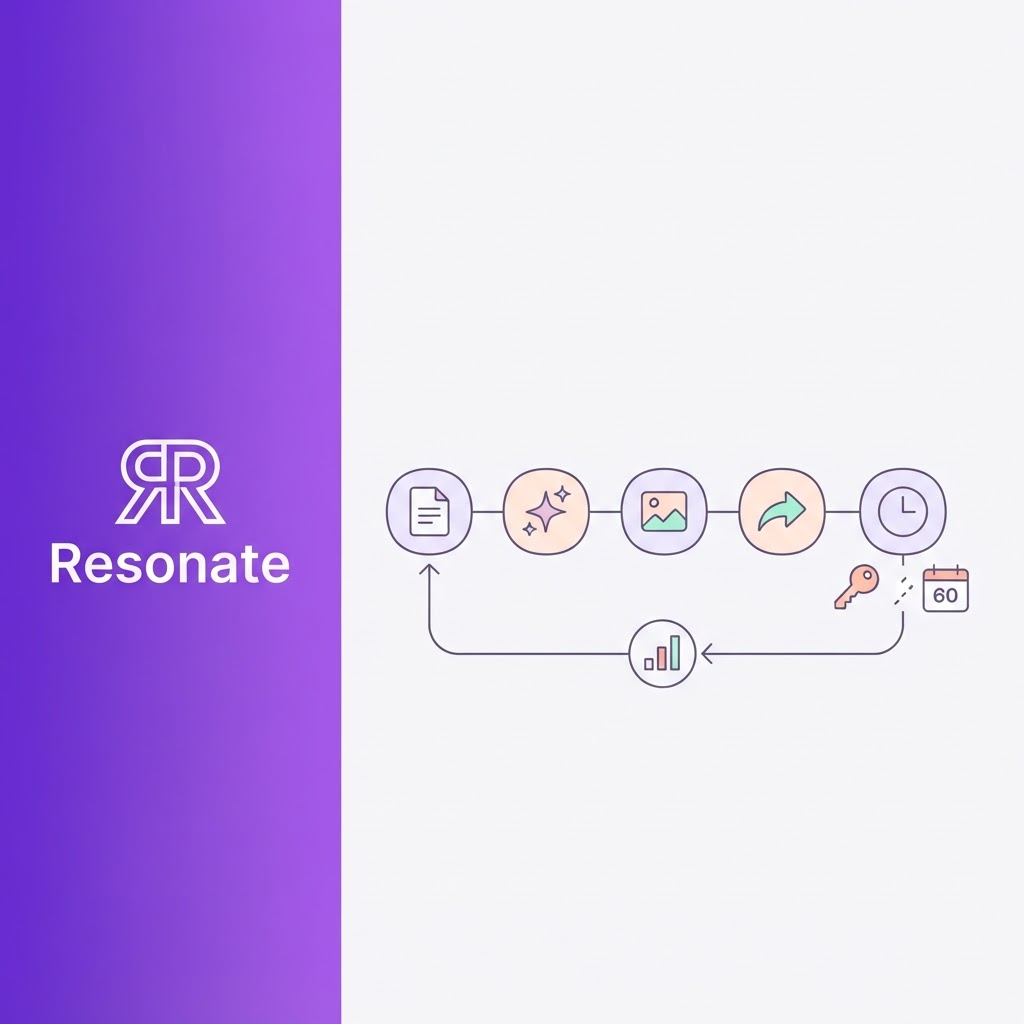
A LinkedIn content pipeline in n8n takes an afternoon to build and a few hours a quarter to keep alive. Most guides cover the afternoon. This one covers both.
The typical template wires five nodes together: a Google Sheet of topics, an LLM, an image generator, the LinkedIn node and a schedule. It works on day one. Then three things go wrong.
- The workflow stops posting. LinkedIn access tokens for self-serve apps expire after 60 days, and LinkedIn retires each API version about a year after release. Neither failure shows up in your test run.
- The posts read like a template. A one-line "write in my brand voice" prompt produces generic copy, and your network notices by week three.
- Nothing improves. The pipeline publishes and forgets. No engagement data flows back into the prompts, so post 50 is no better than post 1.
This guide shows you how to build LinkedIn content automation in n8n that handles all three. You get the architecture, the LinkedIn API setup, a node-by-node build, a human approval loop, the formatting fix that stops posts from getting cut off, real costs, and an agentic version that uses MCP to hand the hard parts to purpose-built tools.
Who this is for: founders, growth marketers and agency operators who already use n8n (or want to) and need consistent LinkedIn output without a full-time ghostwriter.
What does a production n8n LinkedIn workflow look like?
A production-grade n8n LinkedIn workflow splits into a drafting workflow and a publishing workflow that only talk through a shared content queue.

Drafts flow down into the queue once you approve them; the publishing workflow picks up due posts, escapes the text, posts and writes the result back. The dashed lines are the two loops most templates skip: an error workflow that stops silent failures and a weekly learning loop that feeds your best posts back into drafting.
How do you set up LinkedIn API access before you open n8n?
You need a LinkedIn developer app with two products enabled before the n8n LinkedIn node can post anything. Do this first, because LinkedIn's approval rules decide what your pipeline can do.
- Create the app. Open the LinkedIn Developer Portal and create an app. LinkedIn asks you to associate it with a Company Page, even if you only plan to post as yourself.
- Add the products. On the Products tab, add Share on LinkedIn and Sign In with LinkedIn using OpenID Connect. n8n's LinkedIn credential docs list both as required.
- Create the credential in n8n. Copy the Client ID and Client Secret into a LinkedIn OAuth2 credential, paste n8n's redirect URL into the app's authorized redirect URLs, then connect your account.
- Decide: person or company page. Posting to your personal profile works with a self-serve app. Posting as a company page needs LinkedIn's Community Management App Review, which takes time and is not guaranteed.
Three limits every guide skips
| Limit | What happens | What to do |
|---|---|---|
| 60-day access tokens | Runs start failing with 401 errors about two months after you connect. LinkedIn reserves programmatic refresh tokens for approved Marketing Developer Platform partners. | Set a calendar reminder for day 50 and reconnect the credential. Add an error alert (covered below). |
| API version sunsets | LinkedIn ships a new monthly API version and supports each one for at least a year before retiring it. The n8n node hardcodes its version header, so an old n8n install can stop posting overnight. | Update n8n at least every quarter. If you call the Posts API from an HTTP Request node, send a current LinkedIn-Version header. |
| Scope changes | Adding a product to your app does not upgrade tokens you already hold. | After any change on the Products tab, delete the n8n credential and create it again. |
The version risk is real. In April 2026, LinkedIn retired version 202504 and the n8n LinkedIn node stopped posting until n8n shipped an update, as community troubleshooting guides and the matching GitHub issues document.
How do you automate LinkedIn posting in n8n, step by step?
The build below runs as two workflows: a drafting workflow that turns raw material into approved posts, and a publishing workflow that posts on schedule and logs the result. Splitting them means a failed post never blocks drafting, and you can pause publishing without losing drafts.
Step 1: Build the content queue
Create a Google Sheet, Airtable base or Notion database with these columns. Every later node reads or writes this table.
| Column | Example | Written by |
|---|---|---|
| id | 2026-10-14-01 | Drafting workflow |
| source | Slack thread on pricing change | Drafting workflow |
| draft | Full post text | AI node |
| status | idea / drafted / approved / posted / failed | Every stage |
| scheduled_for | 2026-10-15 09:00 | You, at approval |
| post_urn | urn:li:share:... | Publishing workflow |
| reactions_7d | 84 | Analytics workflow |
Step 2: Pull ideas from real work, not RSS
Most templates feed the AI news headlines from an RSS feed. Your audience can read the news themselves. Feed the pipeline what only you have: customer call notes, Slack threads, shipped features, closed deals. In n8n, that means a Schedule Trigger followed by a Notion, Slack, Google Drive or HubSpot node that fetches the last seven days of activity. (See turning Notion, Slack and GitHub activity into LinkedIn content.)
Step 3: Draft with an AI Agent node
Pass the source material to an AI Agent or LLM Chain node. Give it three inputs: the raw material, five of your best past posts as examples, and a short style guide (covered in the next section). Ask for one post under 1,300 characters with the hook on the first line.
Step 4: Route to human approval
Send each draft to Slack or email with approve, edit and reject options, then pause the run with a Wait node until someone responds. Approved drafts get status = approved and a scheduled_for time.
Step 5: Publish on schedule
The publishing workflow runs every 30 minutes. It selects rows where status = approved and scheduled_for has passed, escapes the text, posts through the LinkedIn node (Post > Create, Post As: Person), and writes the returned post URN back to the row with status = posted.
Step 6: Catch failures
Create a separate workflow with an Error Trigger node and set it as the error workflow for both pipelines. On any failure, it sends you a Slack message with the node name and error text, and marks the row failed so the next run does not post it twice.
How do you make automated posts sound like you and publish correctly?
Voice and formatting decide whether automated posts help or hurt your reputation. Both need more than a prompt line.
Calibrate voice with examples, not adjectives
"Write in a confident, friendly tone" gives the model nothing to copy. Give it evidence instead:
- Five to ten of your best-performing posts, pasted in full as examples. Pick ones with different structures: a story, a list, a contrarian take.
- A rules block built from those posts: average sentence length, how you open, how you close, words you never use, whether you use emoji.
- A banned-phrase list of AI tells your readers spot fast: "in today's fast-paced world", "let's dive in", "game-changer".
Refresh the examples every month with your latest top performers. If you want this done for you, Resonate's voice calibration builds the profile from your post history and recalibrates as you publish.
Add a critique pass before a human sees the draft
Run a second LLM node that scores the draft against your rules and rewrites anything below the bar. Ask it three questions: does the first line stop the scroll, does it sound like the examples, and does it make one clear point. This cuts the drafts you reject at the approval step. Resonate runs the same idea with three specialist critique agents for hook, voice and virality.
Approve in Slack, not a spreadsheet
Sheet-based approval fails because nobody opens the sheet. Send the draft to Slack with approve, edit and reject buttons, and let the n8n Wait node resume the run on response. Edited text should flow back into the queue so the publishing workflow posts your version, not the AI's. For a worked example of the Slack side, see how Resonate turns Slack threads into LinkedIn posts.
Escape reserved characters or lose half your post
LinkedIn's Posts API reads post text in its little text format, where characters like parentheses, brackets, @, #, * and _ act as markup. LinkedIn's docs say every reserved character needs a backslash escape to publish as plain text. Skip this and a post like "Q3 revenue (up 40%)" can publish cut off at the parenthesis.
Add a Code node right before the LinkedIn or HTTP Request node:
// Escape LinkedIn little-text reserved characters once, just before posting
const RESERVED = /[\\|{}@\[\]()<>#*_~]/g;
return $input.all().map(item => {
  item.json.draft = item.json.draft.replace(RESERVED, c => '\\' + c);
  return item;
});
Escape exactly once. Text escaped twice publishes with visible backslashes. The trade-off: escaped # and @ publish as plain text, so hashtags and mentions lose their links unless you build them with LinkedIn's mention and hashtag templates.
Also strip Markdown before escaping. LLMs wrap bold words in ** and LinkedIn shows the asterisks as text.
How do you keep it running, know what it costs, and make it learn?
A pipeline that posts is the starting line. A pipeline that posts reliably, at a known cost, and gets better each month is the goal.
Reliability checklist
- Error Trigger workflow alerts you in Slack on any failed run
- Publishing workflow checks status before posting, so a retry never double-posts
- Calendar reminder to reconnect the LinkedIn credential every 50 days
- n8n updated at least quarterly to stay ahead of LinkedIn API version sunsets
- Escape step sits directly before the publish node, and nowhere else
- A weekly test post to a private audience or a manual check of the last three published posts
What it costs
The software is cheap. The maintenance time is the real cost. Figures below are estimates for 12 posts a month; check current vendor pricing before you budget.
| Line item | Self-hosted n8n | n8n Cloud |
|---|---|---|
| n8n | Server costs only (small VPS) | Monthly plan, sized by executions |
| LLM drafting and critique | A few dollars a month at 12 posts | Same |
| Image generation (optional) | A few dollars a month | Same |
| LinkedIn API | Free | Free |
| Setup time | One to two days | One day |
| Maintenance time | Two to four hours a month (tokens, updates, prompt tuning, failed runs) | Two to three hours a month |
If your hourly rate is high, the maintenance line outweighs every other row. Factor that into the build-versus-buy decision at the end of this guide.
Close the loop with performance data
The built-in n8n LinkedIn node only creates posts. It has no analytics operation, so your pipeline cannot see which posts worked unless you add that step yourself. A simple loop that works:
- Seven days after each post, record reactions, comments and impressions in the queue table (manually, from LinkedIn's post analytics, or through a tool that exposes them).
- Once a week, a workflow sorts posted rows by engagement and copies the top three into your voice examples.
- The same workflow passes the top and bottom performers to an LLM and asks what separates them. Append its answer to the style rules.
Comments carry more weight than likes in how LinkedIn distributes posts, so weight them higher when you rank. Our breakdown of the LinkedIn algorithm in 2026 explains why. If you would rather not build this loop, Resonate's self-learning analytics feed engagement back into the voice model automatically.
What is the agentic version with n8n and MCP?
The hardest parts of this pipeline are voice, critique, analytics and LinkedIn API upkeep. You can keep n8n as the orchestrator and hand those parts to specialised tools over the Model Context Protocol (MCP).
n8n ships two nodes for this. The MCP Client node calls an MCP server's tools as regular workflow steps. The MCP Client Tool node hands those tools to an AI Agent node, which decides when to call them. Both support OAuth2, so you connect once and skip API keys in your workflow.
Resonate's MCP server supports n8n and exposes the steps this guide built by hand:
| Pipeline stage | Built by hand in n8n | Resonate MCP tool |
|---|---|---|
| Ideas from real work | Notion, Slack and Drive nodes plus a summarising prompt | list_ideas |
| Draft in your voice | AI Agent node with pasted examples | generate_draft, get_voice_profile |
| Critique | Second LLM node with a scoring prompt | score_post |
| Publish | LinkedIn node, escape step, token and version upkeep | schedule_post |
| Learn from results | Manual metrics plus a weekly analysis workflow | get_content_analytics |
A lean agentic n8n LinkedIn workflow then looks like this: a Schedule Trigger runs every Monday, an AI Agent with the MCP Client Tool calls list_ideas and generate_draft for the three strongest ideas, score_post filters out weak drafts, a Slack message collects your approval, and schedule_post queues the approved posts. Your n8n canvas drops from around 15 nodes to about six, and the LinkedIn credential, escaping and version upkeep leave your workflow entirely.
Agencies get one more benefit: Resonate scopes MCP tokens per workspace, so each client's voice and analytics stay isolated. See Resonate for agencies for multi-client setups, or the seven signs your agency needs an AI content system.
Should you build it yourself or use a purpose-built tool?
Build the full pipeline in n8n if you enjoy maintaining workflows, post to one personal profile, and treat the setup as a learning project. Use a purpose-built tool, alone or through MCP, if your time is worth more than the subscription or you manage several voices.
| Factor | Pure n8n build | n8n + Resonate MCP | Resonate app only |
|---|---|---|---|
| Setup time | One to two days | A few hours | About 10 minutes |
| Monthly upkeep | Two to four hours | Under an hour | Minutes a week |
| Voice quality | Depends on your prompts | Calibrated voice model | Calibrated voice model |
| Pre-publish critique | Build your own | Three agents | Three agents |
| Analytics loop | Build your own | Built in | Built in |
| Custom logic and other tools | Unlimited | Unlimited | Within the app |
| Software cost | Lowest | Resonate plan plus n8n | Resonate plan |
Compare current plans on the Resonate pricing page, or read our guide to choosing an AI ghostwriting tool for LinkedIn.
Ready to skip the maintenance? Start a free Resonate trial and connect it to your n8n workflow over MCP.
Frequently asked questions
Can n8n post to LinkedIn automatically?
Yes. The built-in LinkedIn node creates text, image and article posts on a personal profile once you connect a developer app with Share on LinkedIn and OpenID Connect enabled. Company page posting requires LinkedIn's Community Management App Review.
Why did my n8n LinkedIn workflow stop working?
The two common causes are an expired access token (self-serve tokens last 60 days) and a retired LinkedIn API version in an outdated n8n install. Reconnect the credential, then update n8n.
Why are my LinkedIn posts from n8n cut off?
LinkedIn treats characters like parentheses, brackets, @ and # as markup in API posts. Escape them with a backslash in a Code node right before publishing.
Can n8n post carousels or videos to LinkedIn?
The built-in node supports one image or one article link per post. For other formats you need the HTTP Request node and LinkedIn's API directly, or a tool that handles them.
Should I fully automate LinkedIn posting?
Automate research, drafting, critique and scheduling. Keep a human approval step before anything publishes. Your name is on every post, and a two-minute review catches the errors that cost trust.
What is the difference between n8n and an MCP-based LinkedIn tool?
n8n connects triggers and actions you define step by step. MCP lets an AI agent discover and call another tool's capabilities, such as drafting in your voice or scoring a post, without you building those steps.

Content Writer @ Resonate
Charlotte explores LinkedIn content, personal branding, AI writing, and founder-led marketing at Resonate. She believes the best content comes from real experience, not generic advice, and writes practical insights to help founders turn what they already know into content that people want to read.
Write LinkedIn content that sounds like you
with Resonate's AI Voice Engine